





* . *
  • About
  • Advertise
  • Privacy & Policy
  • Contact
Friday, March 13, 2026
Earth-News
  • Home
  • Business
  • Entertainment

    Get Inspired This Weekend with Fresh Ideas for Going Green

    Seattle’s Wing Luke Museum Announces Exciting New Executive Director

    Golden Nugget Owner Eyes Major Acquisition of Caesars Entertainment

    Inspired Entertainment Unveils Exciting Q4 2025 Earnings Results

    Inspired Entertainment Q4 2025: Record-Breaking Margins Outshine EPS Challenges

    Live Nation and DOJ Settle: What This Means for Live Entertainment Fans

  • General
  • Health
  • News

    Cracking the Code: Why China’s Economic Challenges Aren’t Shaking Markets, Unlike America’s” – Bloomberg

    Trump’s Narrow Window to Spread the Truth About Harris

    Trump’s Narrow Window to Spread the Truth About Harris

    Israel-Gaza war live updates: Hamas leader Ismail Haniyeh assassinated in Iran, group says

    Israel-Gaza war live updates: Hamas leader Ismail Haniyeh assassinated in Iran, group says

    PAP Boss to Niger Delta Youths, Stay Away from the Protest

    PAP Boss to Niger Delta Youths, Stay Away from the Protest

    Court Restricts Protests In Lagos To Freedom, Peace Park

    Court Restricts Protests In Lagos To Freedom, Peace Park

    Fans React to Jazz Jennings’ Inspiring Weight Loss Journey

    Fans React to Jazz Jennings’ Inspiring Weight Loss Journey

    Trending Tags

    • Trump Inauguration
    • United Stated
    • White House
    • Market Stories
    • Election Results
  • Science
  • Sports
  • Technology

    Eight Midwestern Universities Unite to Launch Innovative Technology Hub in San Francisco

    Top Industry Experts Reveal Crucial Insights on Globant SA and Uber Technologies

    JIATF 401 Publishes Guide to Counter-Drone Technology and Privacy Protections – U.S. Department of War (.gov)

    Could This Technology Pose the Greatest Threat to American Democracy?

    Breakthrough Discovery: 80 Key Proteins Uncovered in Plasma Membrane Repair

    Cheyenne Police Invite Community to Explore New Flock Safety Technology Together

    Trending Tags

    • Nintendo Switch
    • CES 2017
    • Playstation 4 Pro
    • Mark Zuckerberg
No Result
View All Result
  • Home
  • Business
  • Entertainment

    Get Inspired This Weekend with Fresh Ideas for Going Green

    Seattle’s Wing Luke Museum Announces Exciting New Executive Director

    Golden Nugget Owner Eyes Major Acquisition of Caesars Entertainment

    Inspired Entertainment Unveils Exciting Q4 2025 Earnings Results

    Inspired Entertainment Q4 2025: Record-Breaking Margins Outshine EPS Challenges

    Live Nation and DOJ Settle: What This Means for Live Entertainment Fans

  • General
  • Health
  • News

    Cracking the Code: Why China’s Economic Challenges Aren’t Shaking Markets, Unlike America’s” – Bloomberg

    Trump’s Narrow Window to Spread the Truth About Harris

    Trump’s Narrow Window to Spread the Truth About Harris

    Israel-Gaza war live updates: Hamas leader Ismail Haniyeh assassinated in Iran, group says

    Israel-Gaza war live updates: Hamas leader Ismail Haniyeh assassinated in Iran, group says

    PAP Boss to Niger Delta Youths, Stay Away from the Protest

    PAP Boss to Niger Delta Youths, Stay Away from the Protest

    Court Restricts Protests In Lagos To Freedom, Peace Park

    Court Restricts Protests In Lagos To Freedom, Peace Park

    Fans React to Jazz Jennings’ Inspiring Weight Loss Journey

    Fans React to Jazz Jennings’ Inspiring Weight Loss Journey

    Trending Tags

    • Trump Inauguration
    • United Stated
    • White House
    • Market Stories
    • Election Results
  • Science
  • Sports
  • Technology

    Eight Midwestern Universities Unite to Launch Innovative Technology Hub in San Francisco

    Top Industry Experts Reveal Crucial Insights on Globant SA and Uber Technologies

    JIATF 401 Publishes Guide to Counter-Drone Technology and Privacy Protections – U.S. Department of War (.gov)

    Could This Technology Pose the Greatest Threat to American Democracy?

    Breakthrough Discovery: 80 Key Proteins Uncovered in Plasma Membrane Repair

    Cheyenne Police Invite Community to Explore New Flock Safety Technology Together

    Trending Tags

    • Nintendo Switch
    • CES 2017
    • Playstation 4 Pro
    • Mark Zuckerberg
No Result
View All Result
Earth-News
No Result
View All Result
Home Technology

How to find lost gadgets (and avoid losing them)

July 19, 2024
in Technology
How to find lost gadgets (and avoid losing them)
Share on FacebookShare on Twitter

This story was inspired by some unsolicited tech advice from the TSA.

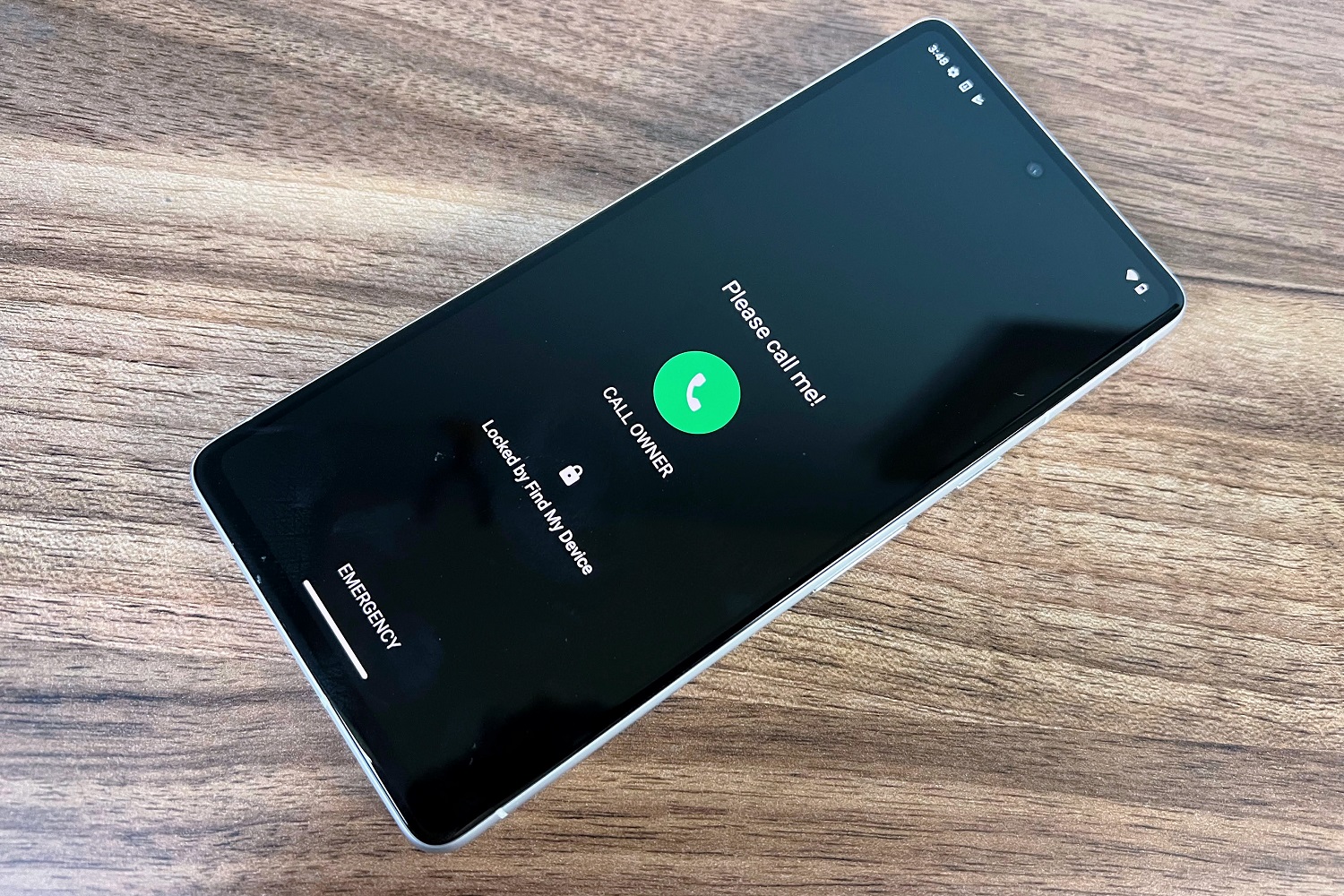
Coming home from a recent vacation, my wife left her phone at airport security. After a frantic race back from the gate, we were able to get the phone back without issue, along with a tip from the agent who was holding onto it: Put an emergency contact on the lock screen, so whoever finds your phone knows who to call.

There are actually a bunch of ways to do this, which I’ll explain shortly. But the incident also brought to mind a broader point about how to deal with lost or stolen devices, both before and after the fact. If you have any trips coming up, it’s worth taking a few minutes to know your options.

This column first appeared in Advisorator, Jared’s tech advice newsletter. Sign up to get more tech tips every week.

iPhone users: Set up Family Sharing

If you’re traveling with a partner and both of you have iPhones, setting up Family Sharing lets you use Apple’s Find My app to play a sound, enable “Lost Mode,” or remotely trigger a factory reset on the other person’s devices. (Family Sharing also has other benefits, like being able to share some subscriptions.)

Set it up under Settings> Your Name> Family Sharing, or view Apple’s documentation for more details.

Family Sharing alone does not share your device’s location with family members. If you want to do that, head to Settings> Your Name> Find My, then enable “Share My Location” and choose the family member you want to share with.

Get familiar with ‘Find My’

Apple, Google, and Microsoft all offer “Find My” utilities to help locate and remotely lock a lost device. Now’s a good time to make sure you’re using them.

Apple: The Find My app should be installed by default, but if not, you can grab it from the App Store. You can use the app to find iPhones, iPads, Macs, AirPods, Apple Watches, AirTags, and other devices connected to Apple’s Find My network. (There’s also a web version at at icloud.com/find, but you’ll need access to your phone or an other Apple device to get past the two-factor authentication prompt.)

Google: Install the Find My Device app from the Google Play Store, or use the web version. While you can’t view your partner’s devices this way, the app has a handy “Guest Mode” that anyone can temporarily log into. Use it to find Android devices, WearOS watches, earbuds with Fast Pair support, and other devices that support Google’s Find My Device network. Unfortunately, the app can’t track a lost Chromebook.

Microsoft: On your PC, head to Settings> Update & Security (in Windows 10) or Privacy & Security (in Windows 11), then select “Find My Device” and make sure it’s turned on. You can then use Microsoft’s Find My Device website to locate or lock down your laptop.

Enable lost mode

All three of the “Find My” tools above allow you to mark your device as lost. This prevents the device from being used until you sign back in, you can also set a custom message with contact information, so whoever finds the device can get it back to you. This feature is called “Lost” mode for Apple devices, “Secure Device” for Android, and “Lock” for Windows PCs.

Add emergency info

“Find My” apps may be useful once you’ve realized your phone has gone missing, but you can also add emergency contact info that anyone can proactively look up from your lock screen.

On iOS: Head to Settings> Emergency SOS> Set up Emergency Contacts in Health. Hit “Edit” and fill out the emergency contact field.

On Android: Varies by phone, but try looking under Settings> Safety & Emergency or About Phone> Emergency Information. On Samsung phones, you can also tap your name at the top of the Contacts app to fill out emergency contact info.

Once set up, whoever finds your phone can hit “Emergency” from the lock screen to find your alternative contact info.

Unfortunately, emergency contact info is a bit buried on both iOS and Android, so someone who finds your phone may not know where to find it. Besides, you might prefer to list your own email address instead of someone else’s phone number as a recovery option, especially if you’re traveling abroad. For those reasons, consider putting an alternative contact directly on the lock screen itself:

On iOS: Set up a lock screen widget with customizable text, such as Lock Screen 16 or Any Text. Here’s a helpful step-by-step guide.

On Android: Varies by phone, but if you search for “Lock Screen” in Settings, you should find an option to add whatever text you like — no third-party apps needed.

Gone for good?

If you can’t get your device back and are worried about unauthorized access, you can use another device to remotely erase the lost one and sign out of your accounts. This is especially important on tablets or computers where you might not have set up a lock screen.

Google’s and Apple’s Find My apps offer an “Erase” function to wipe your devices from afar. Note that Apple says not to do this if you have an AppleCare+ plan with theft and loss coverage, as you’ll need to file a claim and get it approved before erasing the phone.

This Google web page lets you remotely log out of your account on any device, including Chromebooks.

The AppleID website lets you log out of your Apple account on any device, including non-Apple devices (such as Roku players where you signed into the Apple TV app).

Lastly, consider reporting the device’s IMEI number to the police, which may be necessary if you have theft and loss coverage. You can look up that information on the AppleID website, or by clicking the “i” next to your phone on Google’s Find My Device page.

Back up your data

Does your phone have any data that you’d miss if it disappeared forever? Consider this a friendly reminder to have a backup solution in place, at the very least for your photos. This, of course, is an article unto itself.

This column first appeared in Advisorator, Jared’s tech advice newsletter. Sign up to get more tech tips every week.

>>> Read full article>>>
Copyright for syndicated content belongs to the linked Source : PCWorld – https://www.pcworld.com/article/2381343/how-to-find-lost-gadgets-and-avoid-losing-them.html


Tags: Avoidgadgetstechnology
Previous Post

HP is managing AI chip complexity by targeting personas

Next Post

Are premium gaming headsets any better than cheap ones?

Greenpeace Warns of Imminent Ecological Catastrophe from Potential Oil Spills

March 13, 2026

I’m an NIH Whistleblower: Why the Scientific Community Must Embrace Politics

March 13, 2026

Enormous Tyrannosaur Leg Bone Uncovers a 10,000-Pound Prehistoric Giant

March 13, 2026

Kate Middleton Shares Candid Reflections on Life After Her Cancer Battle

March 13, 2026

USA and Canada Gear Up for Rivalry Showdown as Hockey Gold Medalist Joins the Action

March 13, 2026

MND Local: Los Cabos’ ever changing tourist economy – Mexico News Daily

March 13, 2026

Get Inspired This Weekend with Fresh Ideas for Going Green

March 13, 2026

AI Tools in Medical Education and Health Care: Climate Impact and Sustainable Practices | Newswise – Newswise

March 13, 2026

Gilli­brand in­tro­duces bill aimed to stop financial predators from scamming seniors – Spectrum News

March 13, 2026

Eight Midwestern Universities Unite to Launch Innovative Technology Hub in San Francisco

March 13, 2026

Categories

Archives

March 2026
M T W T F S S
 1
2345678
9101112131415
16171819202122
23242526272829
3031  
« Feb    
Earth-News.info

The Earth News is an independent English-language daily published Website from all around the World News

Browse by Category

  • Business (20,132)
  • Ecology (1,115)
  • Economy (1,133)
  • Entertainment (22,010)
  • General (20,375)
  • Health (10,171)
  • Lifestyle (1,147)
  • News (22,149)
  • People (1,136)
  • Politics (1,151)
  • Science (16,349)
  • Sports (21,635)
  • Technology (16,116)
  • World (1,126)

Recent News

Greenpeace Warns of Imminent Ecological Catastrophe from Potential Oil Spills

March 13, 2026

I’m an NIH Whistleblower: Why the Scientific Community Must Embrace Politics

March 13, 2026
  • About
  • Advertise
  • Privacy & Policy
  • Contact

© 2023 earth-news.info

No Result
View All Result

© 2023 earth-news.info

No Result
View All Result

© 2023 earth-news.info

Go to mobile version
