





* . *
  • About
  • Advertise
  • Privacy & Policy
  • Contact
Saturday, June 20, 2026
Earth-News
  • Home
  • Business
  • Entertainment

    Henry Winkler says Ron Howard was ‘almost vomiting’ when Happy Days made this huge change – Entertainment Weekly

    IDW Dark Comics Score Big with Sports Drama in ‘Smile’ and Chilling Horror in the Florida Keys with ‘A Quiet Place

    Beloved Retro Jim Henson Characters Star in an Exciting New Show Coming to Harrisburg

    JUST IN: Tucker Wetmore Inks With Sandbox Entertainment – MusicRow.com

    Explosive Fourth of July Celebration Bursting with Rodeo Thrills and Destruction Derby Excitement

    Stephen Colbert’s Final ‘Late Show’ Peanuts Stunt Triggers Surprising Fallout

  • General
  • Health
  • News

    Cracking the Code: Why China’s Economic Challenges Aren’t Shaking Markets, Unlike America’s” – Bloomberg

    Trump’s Narrow Window to Spread the Truth About Harris

    Trump’s Narrow Window to Spread the Truth About Harris

    Israel-Gaza war live updates: Hamas leader Ismail Haniyeh assassinated in Iran, group says

    Israel-Gaza war live updates: Hamas leader Ismail Haniyeh assassinated in Iran, group says

    PAP Boss to Niger Delta Youths, Stay Away from the Protest

    PAP Boss to Niger Delta Youths, Stay Away from the Protest

    Court Restricts Protests In Lagos To Freedom, Peace Park

    Court Restricts Protests In Lagos To Freedom, Peace Park

    Fans React to Jazz Jennings’ Inspiring Weight Loss Journey

    Fans React to Jazz Jennings’ Inspiring Weight Loss Journey

    Trending Tags

    • Trump Inauguration
    • United Stated
    • White House
    • Market Stories
    • Election Results
  • Science
  • Sports
  • Technology

    Durst Group Celebrates 90 Years of Innovation with Thrilling Durst NEXT Technology Festival in Brixen

    License Plate Reader Technology Breaks Open Auburn Shooting Case with Key Arrest

    Cohere Broadens Its Reach with Acquisition of Reliant AI to Launch Groundbreaking Sovereign Biopharma Platform

    How Satellite Technology Is Transforming the Future of Global Drinking Water Protection

    Why the Most Game-Changing Innovation of the Next Decade Could Surprise You

    FC Barcelona Launches Its First Signature Fragrance, Fusing Emotion, Memory, and Innovation

    Trending Tags

    • Nintendo Switch
    • CES 2017
    • Playstation 4 Pro
    • Mark Zuckerberg
No Result
View All Result
  • Home
  • Business
  • Entertainment

    Henry Winkler says Ron Howard was ‘almost vomiting’ when Happy Days made this huge change – Entertainment Weekly

    IDW Dark Comics Score Big with Sports Drama in ‘Smile’ and Chilling Horror in the Florida Keys with ‘A Quiet Place

    Beloved Retro Jim Henson Characters Star in an Exciting New Show Coming to Harrisburg

    JUST IN: Tucker Wetmore Inks With Sandbox Entertainment – MusicRow.com

    Explosive Fourth of July Celebration Bursting with Rodeo Thrills and Destruction Derby Excitement

    Stephen Colbert’s Final ‘Late Show’ Peanuts Stunt Triggers Surprising Fallout

  • General
  • Health
  • News

    Cracking the Code: Why China’s Economic Challenges Aren’t Shaking Markets, Unlike America’s” – Bloomberg

    Trump’s Narrow Window to Spread the Truth About Harris

    Trump’s Narrow Window to Spread the Truth About Harris

    Israel-Gaza war live updates: Hamas leader Ismail Haniyeh assassinated in Iran, group says

    Israel-Gaza war live updates: Hamas leader Ismail Haniyeh assassinated in Iran, group says

    PAP Boss to Niger Delta Youths, Stay Away from the Protest

    PAP Boss to Niger Delta Youths, Stay Away from the Protest

    Court Restricts Protests In Lagos To Freedom, Peace Park

    Court Restricts Protests In Lagos To Freedom, Peace Park

    Fans React to Jazz Jennings’ Inspiring Weight Loss Journey

    Fans React to Jazz Jennings’ Inspiring Weight Loss Journey

    Trending Tags

    • Trump Inauguration
    • United Stated
    • White House
    • Market Stories
    • Election Results
  • Science
  • Sports
  • Technology

    Durst Group Celebrates 90 Years of Innovation with Thrilling Durst NEXT Technology Festival in Brixen

    License Plate Reader Technology Breaks Open Auburn Shooting Case with Key Arrest

    Cohere Broadens Its Reach with Acquisition of Reliant AI to Launch Groundbreaking Sovereign Biopharma Platform

    How Satellite Technology Is Transforming the Future of Global Drinking Water Protection

    Why the Most Game-Changing Innovation of the Next Decade Could Surprise You

    FC Barcelona Launches Its First Signature Fragrance, Fusing Emotion, Memory, and Innovation

    Trending Tags

    • Nintendo Switch
    • CES 2017
    • Playstation 4 Pro
    • Mark Zuckerberg
No Result
View All Result
Earth-News
No Result
View All Result
Home Technology

I changed these 11 Facebook settings, and you should too

November 3, 2023
in Technology
I changed these 11 Facebook settings, and you should too
Share on FacebookShare on Twitter

Whether you love spending time on Facebook or merely do so out of obligation, there are lots of ways to make the experience more tolerable.

I’ve been spending a bit more time on the site lately, having been roped into a handful of Facebook Groups that I need to keep tabs on. As such, I’ve also dug into Facebook’s labyrinthine settings menu, looking for ways to protect privacy, lock down profile access, and generally make the site feel less obnoxious.

Below are the 11 quick changes that I ended up making, and that I recommend for anyone who spends time on Facebook as well:

Finding Facebook settings

Most of the tweaks below reside inside Facebook’s main settings menu, so here’s a quick refresher on how to get there:

In the mobile app: Tap the “More” tab, then tap the gear icon at the top of the screen.

On the web: Click the down arrow in the top-right corner, then select Settings & privacy> Settings.

I’ll just refer to these menus as “Facebook Settings” from here on.

Eliminate annoyances
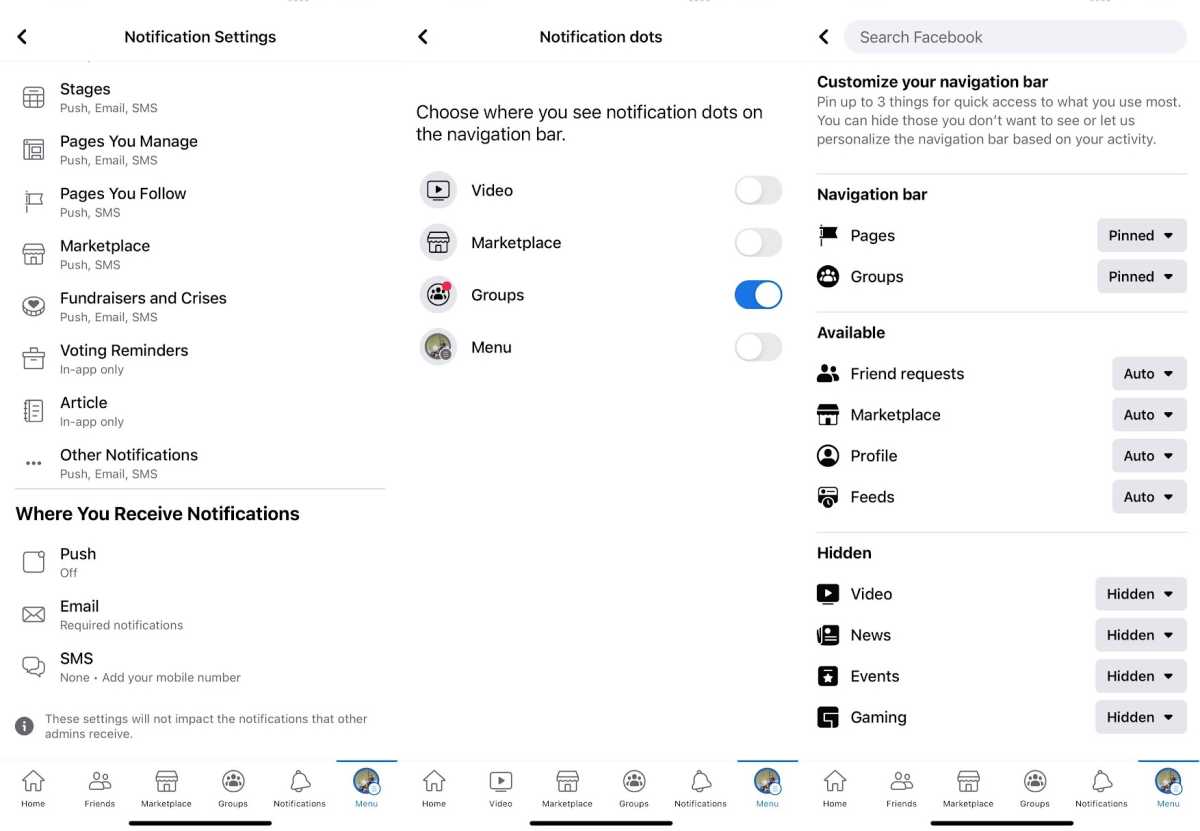
Facebook notification and navigation bar settings

Jared Newman / Foundry

Turn off external notifications: Head to Facebook Settings> Notifications, and you’ll find a list of controls so granular that I can only assume Facebook wants to scare people away.

I’d suggest scrolling right past those settings to the “Where you’ll receive notifications” section. For both the Email and SMS options, select “Required notifications,” and you won’t get any texts or emails about status updates, comments, and the like. Then, you can scroll back up and play with the options for in-app notifications (though I prefer to disable all those alerts in my phone’s settings menu).

No more video nags: In a shameless attempt to juice its viewership numbers, Facebook puts a little dot above its video tab even when it has nothing important to share. To hide the dot, head to Settings> Navigation bar> Manage notification dots, then uncheck “Videos.”

Customize the menu bar: Alternatively, you can hide videos and other unwanted tabs by heading to Facebook Settings> Shortcuts> Navigation bar in the mobile app. Select “Pin” for the sections you care about and “Hide” for the ones you don’t.

Disable autoplay: To further reduce video-related annoyances, turn off autoplay by heading to Facebook Settings> Media, then selecting “Never Autoplay Videos.” On the web, head to Settings> Videos, then change “Auto-Play Videos” to “Off.”

Protect your privacy
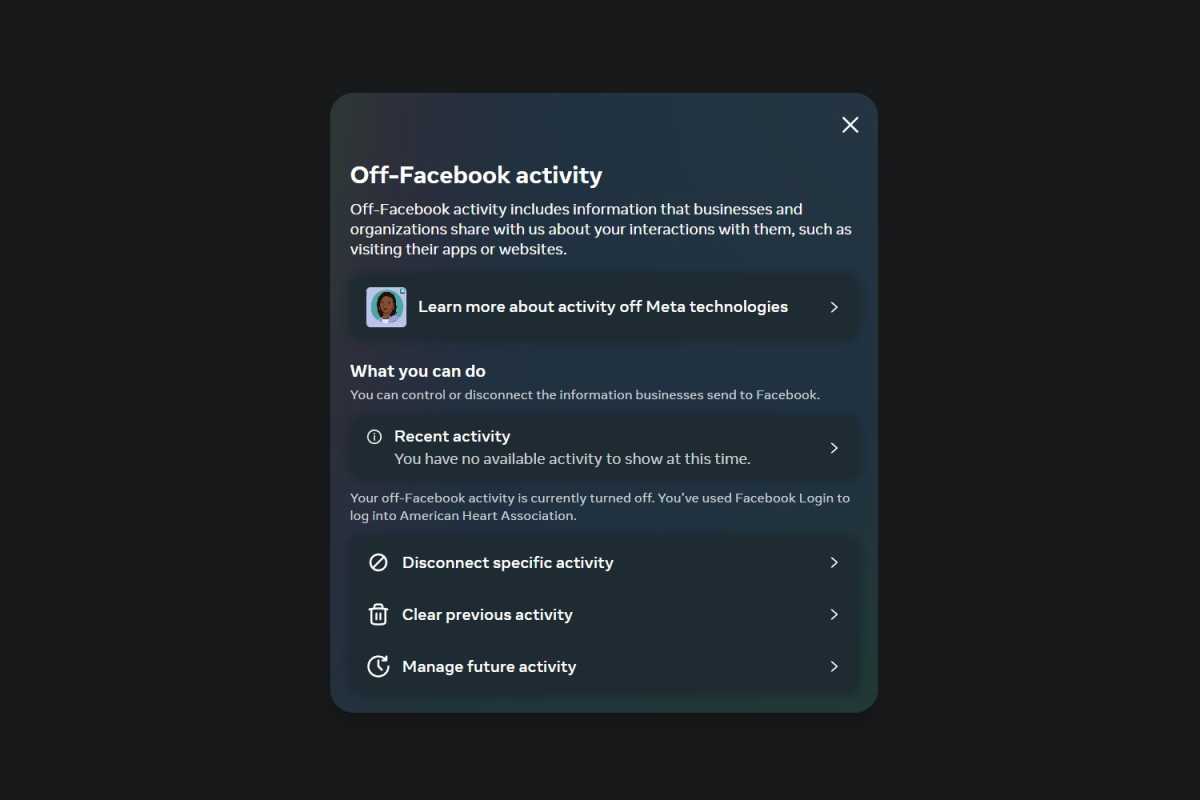
Off-Facebook activity menu

Jared Newman / Foundry

Stop creepy data collection: By default, Facebook collects all sorts of data from the apps you use, websites you visit, and businesses you patronize, all for ad-targeting purposes. If you’ve ever felt like Facebook is recording your real life conversations, this widespread tracking is probably why.

To stop it, head to the “Off-Facebook Activity” page (in the mobile app, you’ll find this under Facebook Settings> Off-Facebook activity), then, follow these two steps:

Select “Clear History” or “Clear Previous Activity.”

Select “Disconnect future activity,” then make sure “Future Off-Facebook Activity” is unchecked.

You will be logged out of any websites where you use the “Sign in with Facebook” option, but I’d suggest using other sign-in methods anyway to further minimize what Facebook knows about you.

Disable autofill: If you tap on a web link in the Facebook mobile app, it can collect any form data you enter—such as emails or addresses—for targeted ads. To disable this, head to Facebook Settings> Browser, then hit “Clear” at the top and uncheck the “Autofill” toggles underneath.

Delete your phone number: Facebook can use your phone number for targeted ads even if you only provided it for account security purposes. Assuming you’ve set up a different two-factor authentication method, consider deleting your number from Facebook by heading to Facebook Settings> Accounts Center> Personal Details> Contact Info. Select your number, then hit “Delete number.”

Control who sees what
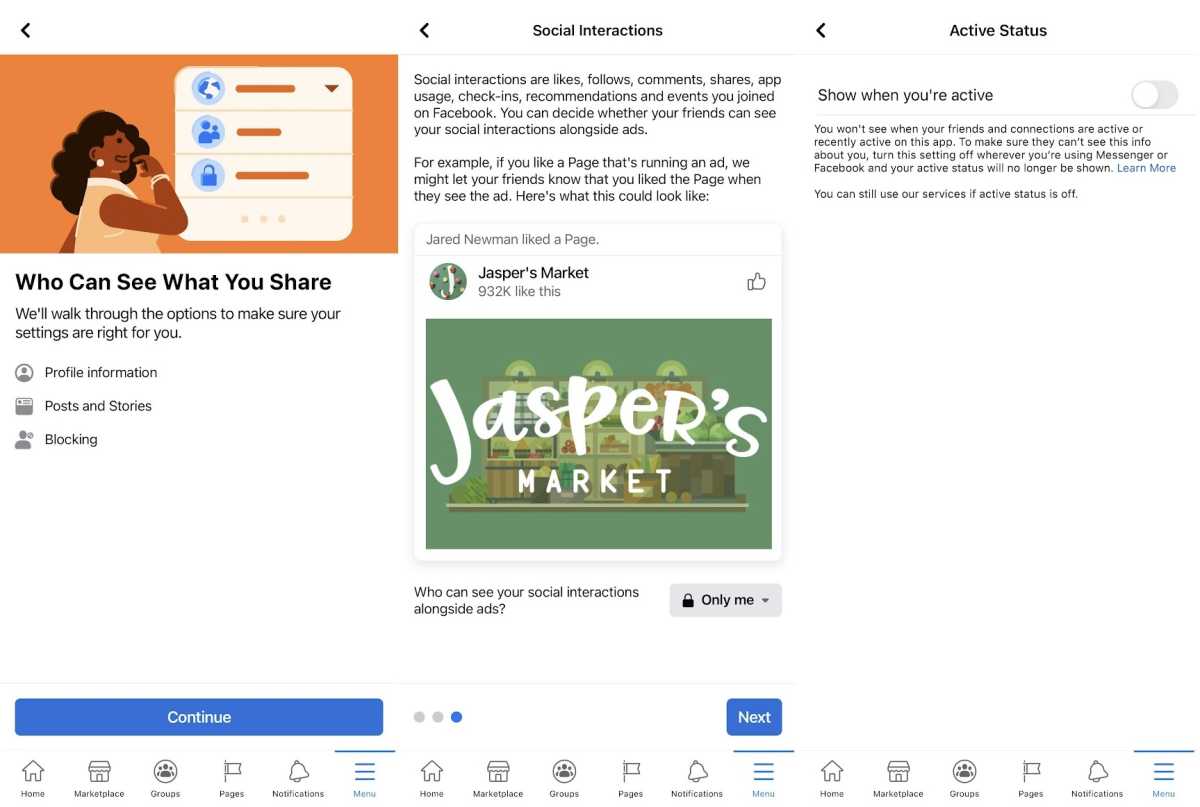
Facebook's

Jared Newman / Foundry

Restrict your posts: Want to prevent certain connections from seeing some of your posts? Here’s my preferred method:

On Facebook’s website, go to your Friends list, select “Custom Lists,” then “Create List.” Give it a name, like “Work Colleagues” or “Barely Know.”

Click the “Add Friends” button, then choose who you want to exclude.

When posting, click the drop-down menu under your name, then select “Friends except…” Select your newly-created created list, and hit “Save Changes.” All future posts will now be hidden from people on that list unless you change this setting later.

Clean up old posts: In Facebook Settings, hit “Privacy Checkup” at the top, then select “Who Can See What You Share.” From here you can control who has access to your profile info and future posts, but you can also restrict old posts to just your friends with the “Limit past posts” function.

Don’t do free marketing: To prevent friends from seeing that you’ve “liked” a brand in Facebook ads, head back to the “Privacy Checkup” section and select “Your ad preferences on Facebook.” On the last page of this section, choose “Only me” from the drop-down.

Hide your status: To stop friends from seeing when you’re active on Facebook, open the mobile app and head to Settings> Active status, then uncheck “Show when you’re active.” (On the web, you’ll find this option by clicking the Messenger icon, selecting the “…” button, and clicking “Active Status.” Just note when this is disabled, you won’t be able to see friends’ statuses either.

While these settings tweaks won’t make Facebook drastically more enjoyable to use, they do at least make it feel somewhat calmer and less privacy-invasive.

This story first appeared in Advisorator, Jared’s weekly tech advice newsletter. Sign up to get new tips every Tuesday.

>>> Read full article>>>
Copyright for syndicated content belongs to the linked Source : PCWorld – https://www.pcworld.com/article/2121003/i-changed-these-11-facebook-settings-and-you-should-too.html


Tags: changedfacebooktechnology
Previous Post

8BitDo Retro Keyboard review: Fun and functional

Next Post

China’s Shenzhou-16 Manned Spacecraft Returns Successfully

Scotland vs Morocco: Thrilling Highlights from the 2026 FIFA World Cup™

June 20, 2026

It’s Trump’s Economy and Americans Are Not Impressed, June 2026 – Marist Poll

June 20, 2026

Empowering the Church: United in Tackling HIV and Mental Health Challenges

June 20, 2026

Henry Winkler says Ron Howard was ‘almost vomiting’ when Happy Days made this huge change – Entertainment Weekly

June 19, 2026

Inside Tom Steyer’s Campaign: Money, Politics, and Reflections from the Trail

June 19, 2026

Durst Group Celebrates 90 Years of Innovation with Thrilling Durst NEXT Technology Festival in Brixen

June 19, 2026

Herring Gut Coastal Science Center Welcomes Two New Advisory Council Members

June 19, 2026

Packers Face Off Against Wisconsin Congressman Over Controversial Sports Broadcasting Bill

June 19, 2026

Trump U-Turns on Major Ocean Science Funding Cuts

June 19, 2026

Alzheimer’s Drug Discovery Foundation Seeks New Chief Science Officer as Co-Founder Dr. Howard Fillit Transitions to Emeritus Role

June 19, 2026

Categories

Archives

June 2026
M T W T F S S
1234567
891011121314
15161718192021
22232425262728
2930  
« May    
Earth-News.info

The Earth News is an independent English-language daily published Website from all around the World News

Browse by Category

  • Business (20,132)
  • Ecology (1,274)
  • Economy (1,296)
  • Entertainment (22,173)
  • General (22,185)
  • Health (10,331)
  • Lifestyle (1,307)
  • News (22,149)
  • People (1,298)
  • Politics (1,316)
  • Science (16,510)
  • Sports (21,794)
  • Technology (16,281)
  • World (1,288)

Recent News

Scotland vs Morocco: Thrilling Highlights from the 2026 FIFA World Cup™

June 20, 2026

It’s Trump’s Economy and Americans Are Not Impressed, June 2026 – Marist Poll

June 20, 2026
  • About
  • Advertise
  • Privacy & Policy
  • Contact

© 2023 earth-news.info

No Result
View All Result

© 2023 earth-news.info

No Result
View All Result

© 2023 earth-news.info

Go to mobile version
