





* . *
  • About
  • Advertise
  • Privacy & Policy
  • Contact
Monday, February 2, 2026
Earth-News
  • Home
  • Business
  • Entertainment

    3 Cincinnati Natives Who Took Center Stage at the 2026 Grammy Awards

    2026 Grammy Awards Winners Announced: Live Updates Inside

    Everything You Need to Know About Why AMC Entertainment Holdings, Inc. (AMC) is Trending

    Shreveport Resident Makes Their Voice Heard in 2026 GRAMMY Awards Voting

    Local Students Shine Bright, Win Prestigious National Theater Award at 2026 JTF Atlanta

    Sundance Film Festival to name 2026 award winners – LancasterOnline

  • General
  • Health
  • News

    Cracking the Code: Why China’s Economic Challenges Aren’t Shaking Markets, Unlike America’s” – Bloomberg

    Trump’s Narrow Window to Spread the Truth About Harris

    Trump’s Narrow Window to Spread the Truth About Harris

    Israel-Gaza war live updates: Hamas leader Ismail Haniyeh assassinated in Iran, group says

    Israel-Gaza war live updates: Hamas leader Ismail Haniyeh assassinated in Iran, group says

    PAP Boss to Niger Delta Youths, Stay Away from the Protest

    PAP Boss to Niger Delta Youths, Stay Away from the Protest

    Court Restricts Protests In Lagos To Freedom, Peace Park

    Court Restricts Protests In Lagos To Freedom, Peace Park

    Fans React to Jazz Jennings’ Inspiring Weight Loss Journey

    Fans React to Jazz Jennings’ Inspiring Weight Loss Journey

    Trending Tags

    • Trump Inauguration
    • United Stated
    • White House
    • Market Stories
    • Election Results
  • Science
  • Sports
  • Technology

    Explore the Top 10 Breakthrough Technologies Poised to Revolutionize 2026

    Finance Minister Nirmala Sitharaman’s Budget 2026: How Technology is Empowering Every Indian-from Farmers to Women in STEM and Beyond

    Schools Face Challenges Providing Assistive Technology – Disability Scoop

    Tecsun Technology Unveils Exciting Innovations at Bay Area AI Summit

    Pentagon CTO Appoints Six Defense Tech Veterans to Drive Breakthrough Innovations

    How Technology and Consumer Trends Are Set to Revolutionize Hospitality in 2025

    Trending Tags

    • Nintendo Switch
    • CES 2017
    • Playstation 4 Pro
    • Mark Zuckerberg
No Result
View All Result
  • Home
  • Business
  • Entertainment

    3 Cincinnati Natives Who Took Center Stage at the 2026 Grammy Awards

    2026 Grammy Awards Winners Announced: Live Updates Inside

    Everything You Need to Know About Why AMC Entertainment Holdings, Inc. (AMC) is Trending

    Shreveport Resident Makes Their Voice Heard in 2026 GRAMMY Awards Voting

    Local Students Shine Bright, Win Prestigious National Theater Award at 2026 JTF Atlanta

    Sundance Film Festival to name 2026 award winners – LancasterOnline

  • General
  • Health
  • News

    Cracking the Code: Why China’s Economic Challenges Aren’t Shaking Markets, Unlike America’s” – Bloomberg

    Trump’s Narrow Window to Spread the Truth About Harris

    Trump’s Narrow Window to Spread the Truth About Harris

    Israel-Gaza war live updates: Hamas leader Ismail Haniyeh assassinated in Iran, group says

    Israel-Gaza war live updates: Hamas leader Ismail Haniyeh assassinated in Iran, group says

    PAP Boss to Niger Delta Youths, Stay Away from the Protest

    PAP Boss to Niger Delta Youths, Stay Away from the Protest

    Court Restricts Protests In Lagos To Freedom, Peace Park

    Court Restricts Protests In Lagos To Freedom, Peace Park

    Fans React to Jazz Jennings’ Inspiring Weight Loss Journey

    Fans React to Jazz Jennings’ Inspiring Weight Loss Journey

    Trending Tags

    • Trump Inauguration
    • United Stated
    • White House
    • Market Stories
    • Election Results
  • Science
  • Sports
  • Technology

    Explore the Top 10 Breakthrough Technologies Poised to Revolutionize 2026

    Finance Minister Nirmala Sitharaman’s Budget 2026: How Technology is Empowering Every Indian-from Farmers to Women in STEM and Beyond

    Schools Face Challenges Providing Assistive Technology – Disability Scoop

    Tecsun Technology Unveils Exciting Innovations at Bay Area AI Summit

    Pentagon CTO Appoints Six Defense Tech Veterans to Drive Breakthrough Innovations

    How Technology and Consumer Trends Are Set to Revolutionize Hospitality in 2025

    Trending Tags

    • Nintendo Switch
    • CES 2017
    • Playstation 4 Pro
    • Mark Zuckerberg
No Result
View All Result
Earth-News
No Result
View All Result
Home Business

How to create and configure custom dimensions in GA4

May 30, 2024
in Business
How to create and configure custom dimensions in GA4
Share on FacebookShare on Twitter

Understanding all the features of Google Analytics 4 (GA4) is essential to making the most of it. Doing so allows you to configure the tool to analyze data accurately and efficiently. It also lets you draw the best conclusions for designing, refocusing and defining your digital strategies.

GA4 users can configure many functionalities, including custom dimensions, which allow for more detailed and personalized data analysis.

What are dimensions in GA4?

Google defines a dimension as an attribute of your data. It describes your data, and it’s usually written in text rather than numbers.

https://9453ef31e2da492a6a1fb6f8591a0fe1.safeframe.googlesyndication.com/safeframe/1-0-40/html/container.html

An example of dimensions would be source/medium, which shows how a user arrives at a website:
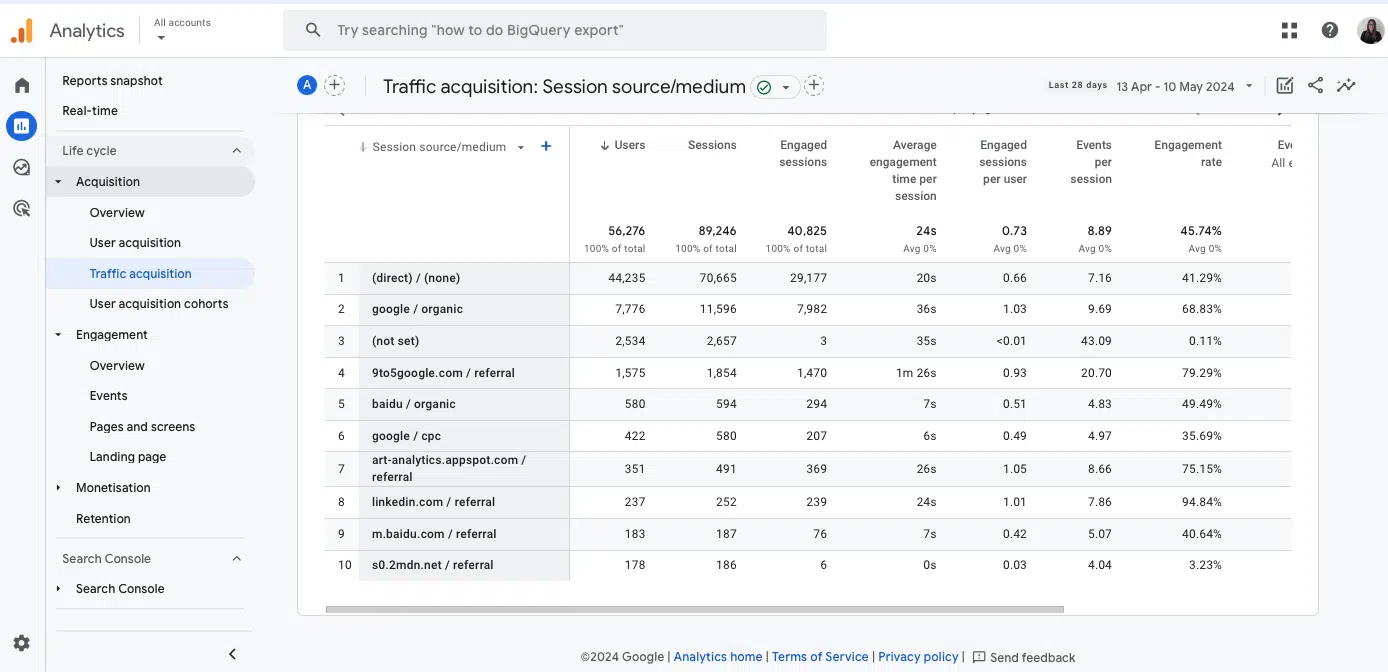
GA4 - Session source / medium

Another example of dimension would also be the Event name, which shows the different events that happen on a website and how the user interacts with it:
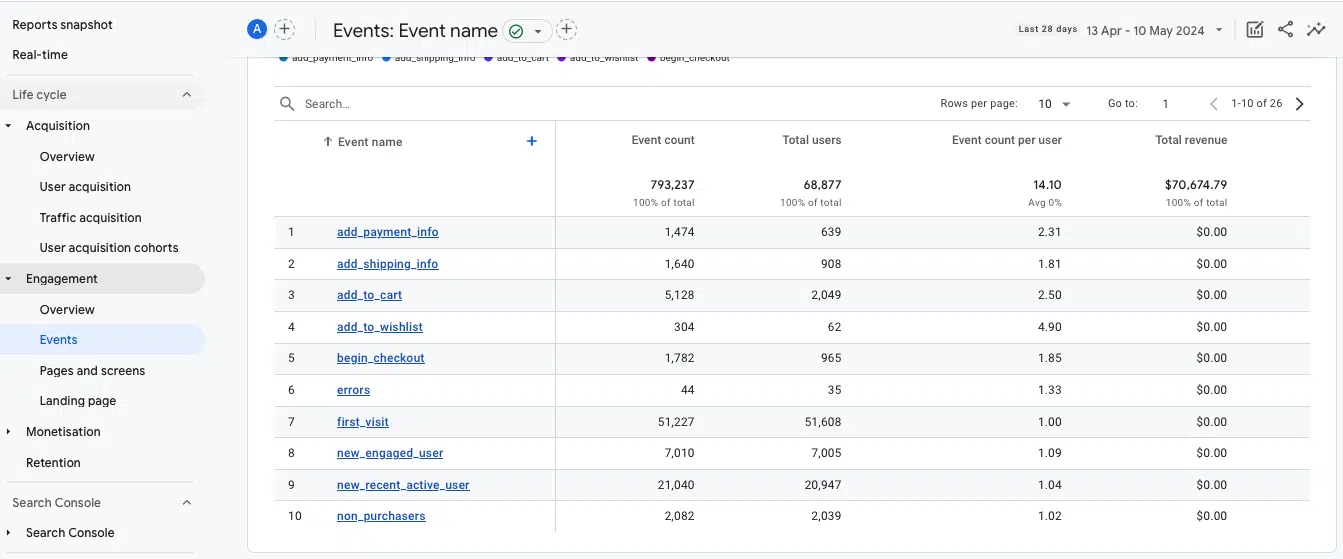
GA4 - Engagement  events

When creating the GA4 account, the tool preconfigures a wide list of dimensions automatically by default.

However, if this is not enough for your strategy’s analysis and you need to analyze attributes in more detail and specifically based on the website’s objectives, you can create custom dimensions.

Events and event parameters

To understand custom dimensions and how to create them, you must first understand some GA4 concepts – events and parameters.

Events are the metrics that allow you to measure specific user interactions on a website, such as loading a page, clicking on a link or submitting a form. 

Event parameters are additional data that site information about those events (i.e., additional information about how users interact with a website).

There are two types of event parameters in GA4, depending on how they are captured by the tool:

Automatically collected parameters: These are preconfigured by GA4, which automatically captures a set of parameters (e.g. page_location, page_referrer or page_title). Google provides a list of all these event parameters created automatically or enhanced measurement.

Custom parameters: These allow you to collect information that is not captured by default. This applies to recommended events and custom events, where custom settings are required.

What are GA4 custom dimensions?

Custom dimensions are attributes that allow you to describe and collect data in a customized way. Essentially, they are parameters you create in GA4 to capture information that is not automatically tracked by the tool.

Types of custom dimensions

Depending on the information that you want to collect in a custom way, you can create different types of custom dimensions, as indicated by Google:

User-scoped custom dimensions let you analyze user-related attributes that describe groups of your user base, such as age, language or country. 

Event-scoped custom dimensions refer to interactions that happen on your website. It could be any event parameter created for the recommended events or custom events, such as generate_lead or login.

Item-scoped custom dimensions, used mainly for ecommerce websites or apps, allow for deeper analysis of item-related information, such as add_to_cart or purchase.

Dig deeper: MarTech’s coverage of Google Analytics 4

When is it recommended to create custom dimensions?

Before creating custom dimensions to analyze data in more detail, it is advisable to check whether these attributes already exist as automatic events predefined by GA4 or as options within enhanced measurement events.

To determine if the data you want to analyze is already provided by automatic events, you can consult the list that Google Analytics offers under Automatically collected events. These events are collected automatically, so the user does not need to perform any additional actions.

This is not the case for the enhanced measurement events, these must be activated within the GA4 account if you want to collect this information.

To activate these attributes, you will do it inside Admin> Data streams> Events> Enhanced measurement.

GA4 - Enhanced measurement events

If the information you want to analyze is not included within these automatic events, it is recommended that you create it as a custom dimension.

Get the daily newsletter search marketers rely on.Business email addressSubscribe

See terms.

How to set up custom dimensions

Regardless of the type of custom dimension, it must be created via Google Tag Manager. Below is a step-by-step guide for configuring an event-scoped custom dimension.

Before getting started, make sure the GA4 and Google Tag Manager accounts are properly configured and linked.

Next, you need to define and create which event parameter you want and send it as a custom dimension in GA4.

In this case, you are going to show in the following image how to create the event parameter to analyze the URL of the video that a user plays on your website:
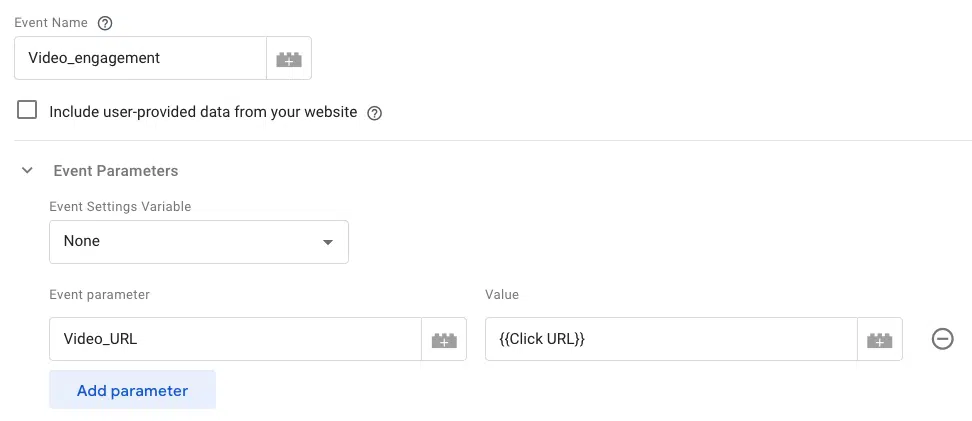
GA4 - Video engagement event

As it is a manually configured event parameter only included in Google Tag Manager, it will not be enough for GA4 to include it in its reports automatically. You will have to notify GA4 about it by going to Admin> Data display> Custom definitions.
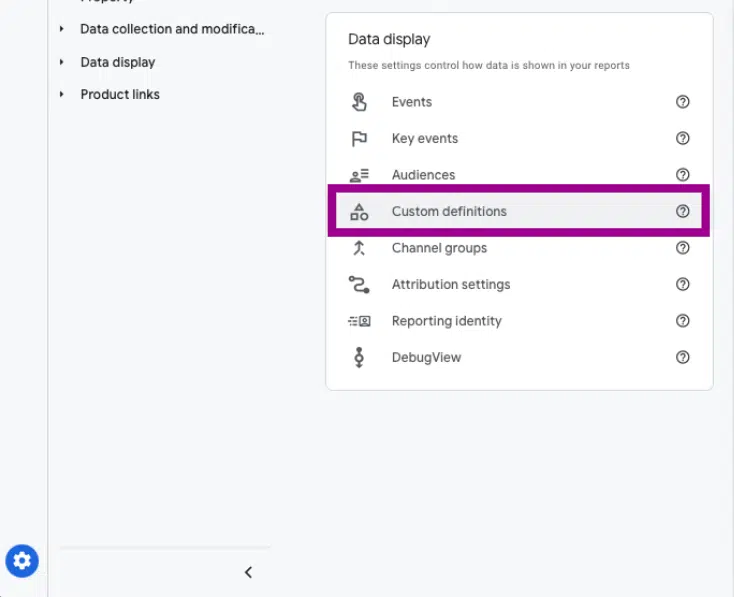
GA4 - Data display  Custom definitions

Then, click on Create custom dimension.
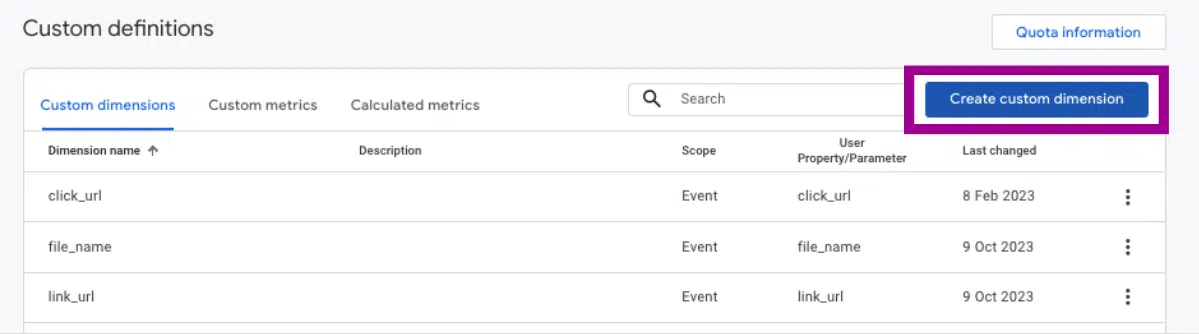
GA4 - Create custom dimension

Create the custom definition with the information from your event parameter:
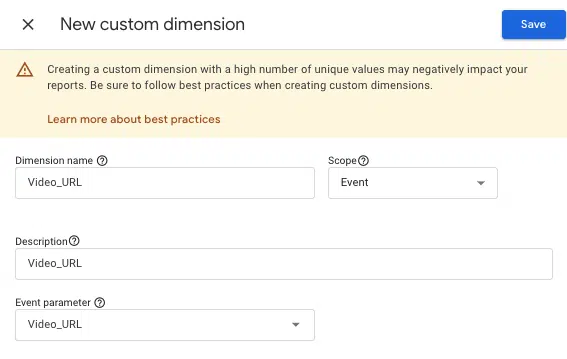
GA4 - New custom dimension

Now that your custom dimension is created, use DebugView to check if it is being collected correctly and is properly configured.

In parallel, within the Custom definitions section, under Quota information, you can monitor the total number of custom dimensions created in your GA4 account.
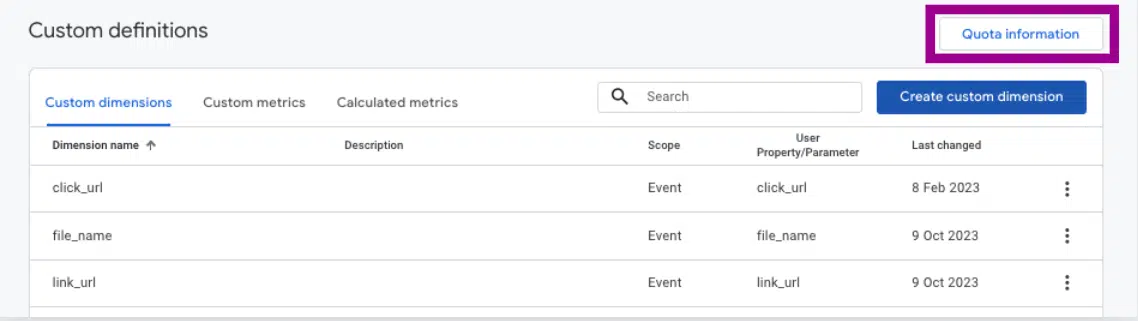
GA4 - Custom definitions  Quota information

How many custom dimensions can I set up in my GA4 account?

The number of custom dimensions that a user can create is limited, although it is often difficult to reach this limit. 

To ensure you create only the most useful dimensions, first define the highest-priority KPIs for your website or app and then create and configure only those dimensions that are truly of interest. To avoid exceeding this limit, use predefined dimensions and metrics whenever possible.
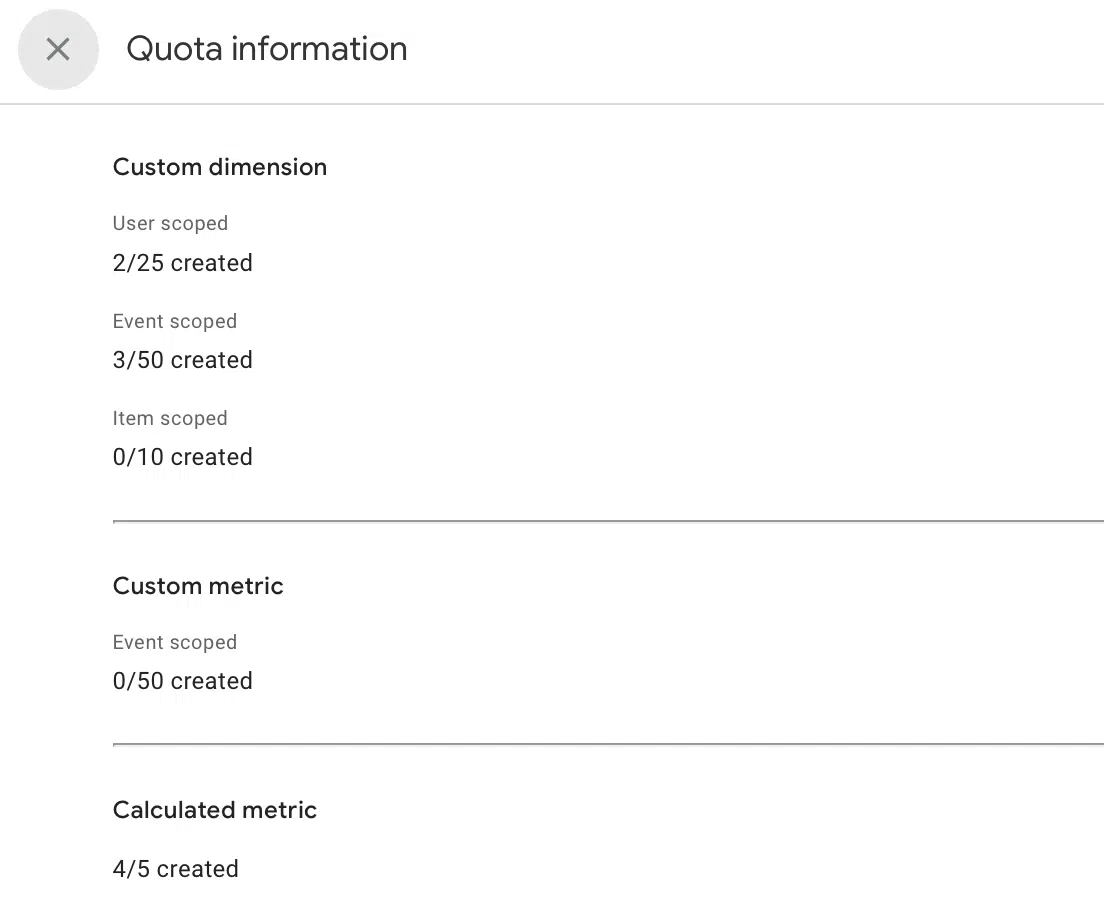
GA4 - Quota information limits

How to analyze custom dimensions

Custom dimensions will provide you with additional information about your data. This information can be analyzed within GA4.

In the case of GA4, you can analyze the custom dimensions through the same reports that the tool offers in a customized way, either in the traffic or events panel, for example: 
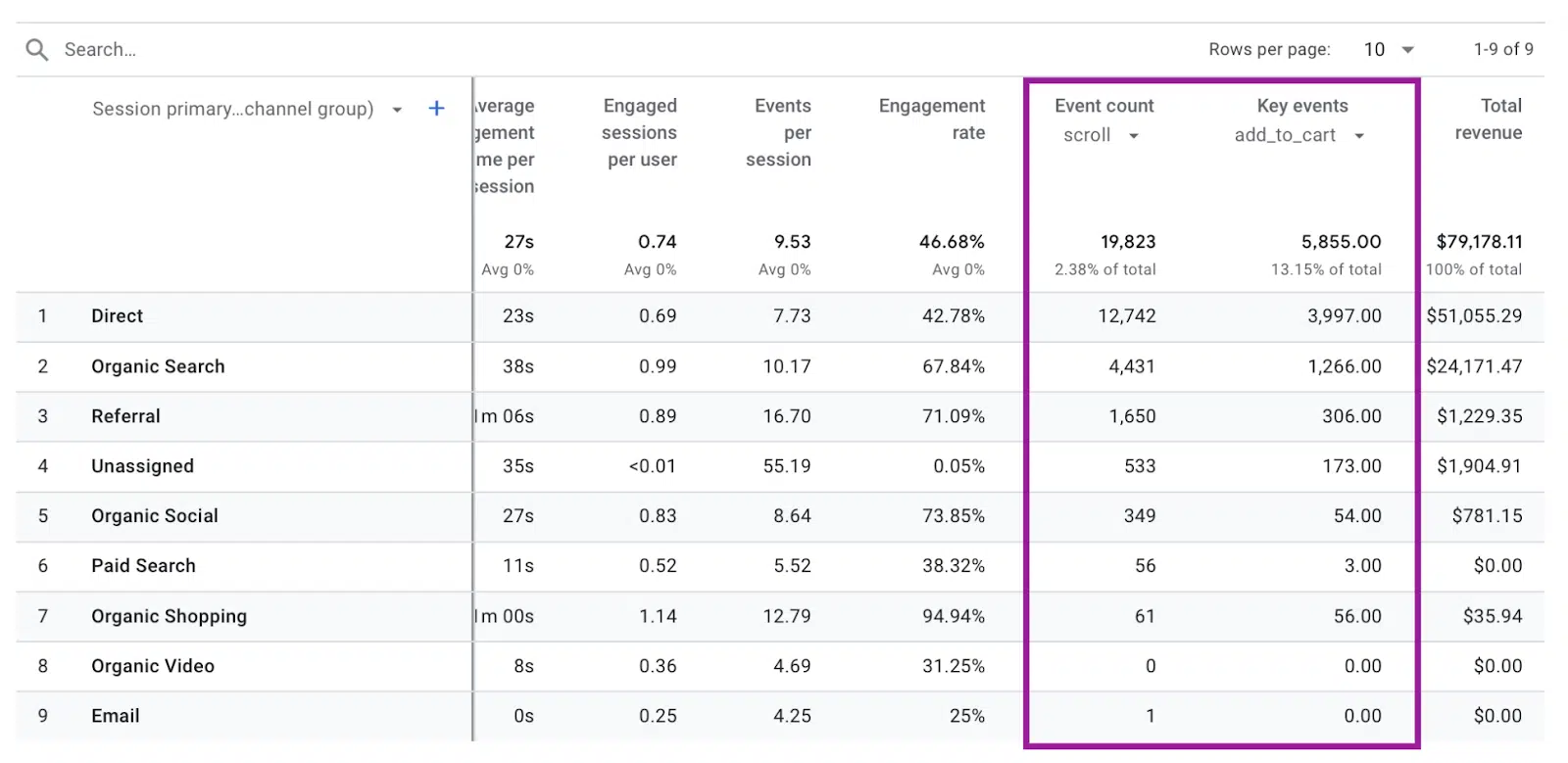
GA4 - How to analyze custom dimensions

Custom dimensions can also provide more information about your data when using the explore section:
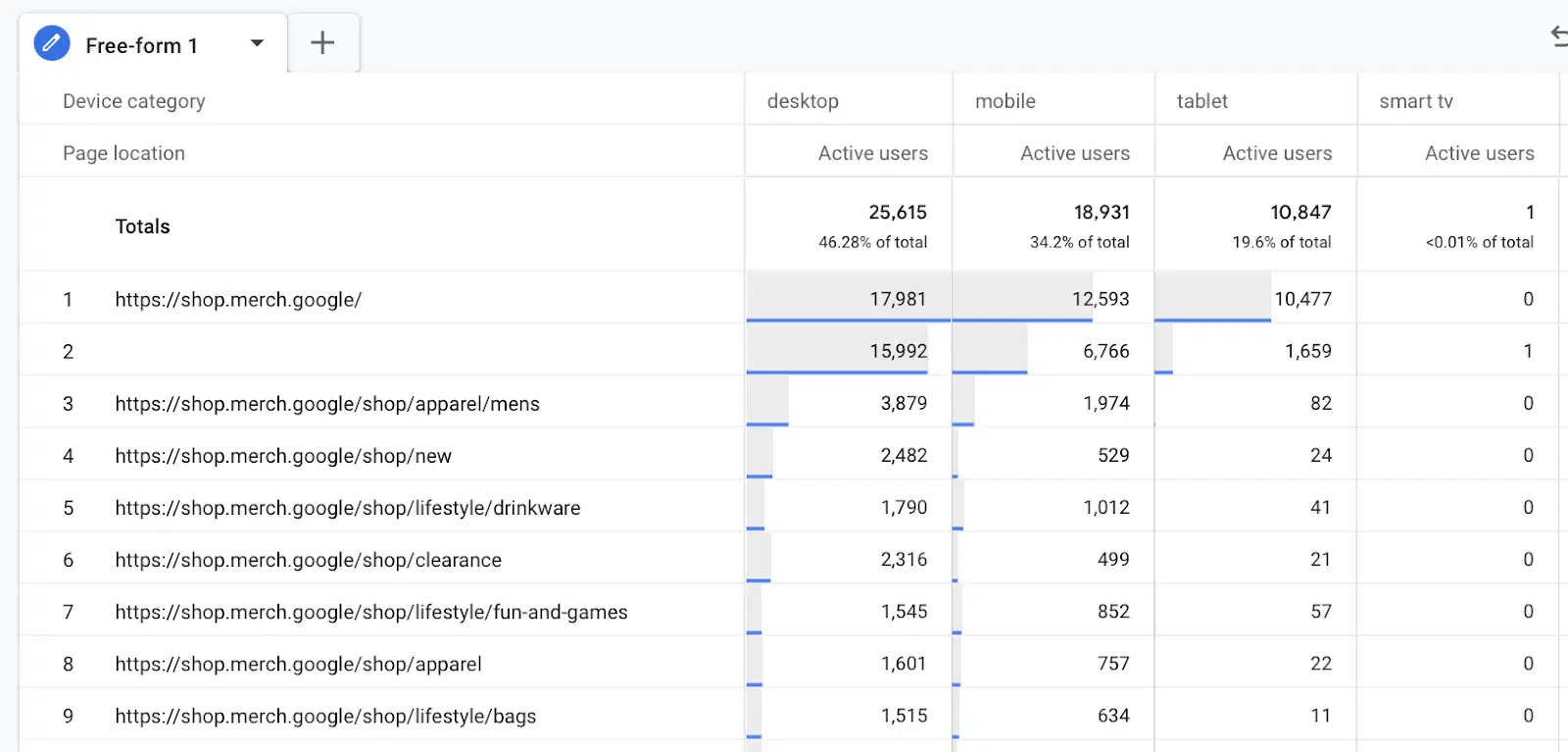
GA4 - Explore custom dimensions

Creating custom dimensions is a valuable method for enhancing your analytics with valuable insights for your business.

Opinions expressed in this article are those of the guest author and not necessarily MarTech. Staff authors are listed here.

>>> Read full article>>>
Copyright for syndicated content belongs to the linked Source : MarTech – https://martech.org/how-to-create-and-configure-custom-dimensions-in-ga4/


Tags: businessconfigureCreate
Previous Post

NASA’s James Webb Space Telescope finds most distant known galaxy

Next Post

Why RCS mobile marketing is set to go big in the U.S.

In a World Full of Threats, This CCA Emerges as the Ultimate Defense

February 2, 2026

Industry Confronts Major Challenges Amid Economic Uncertainty and Slowing Job Market

February 2, 2026

3 Cincinnati Natives Who Took Center Stage at the 2026 Grammy Awards

February 2, 2026

County Exec David Crowley fires official tied to health benefits lapse – Milwaukee Journal Sentinel

February 2, 2026

Trevor Noah Sparks Trump’s Fury with Bold Grammy Jokes About the President and Nicki Minaj

February 2, 2026

Union Budget 2026-27 was all about building assets but ignoring climate and ecological ground realities – Down To Earth

February 2, 2026

STEM students gather on campus to participate in annual Science Olympiad – Purdue Exponent

February 2, 2026

E&E News: DOE scientists blasted climate report ordered up by boss – POLITICO Pro

February 2, 2026

How Ram Kapoor Lost 55 kg: The Powerful Mindset Shift That Transformed His Journey

February 2, 2026

Explore the Top 10 Breakthrough Technologies Poised to Revolutionize 2026

February 2, 2026

Categories

Archives

February 2026
M T W T F S S
 1
2345678
9101112131415
16171819202122
232425262728  
« Jan    
Earth-News.info

The Earth News is an independent English-language daily published Website from all around the World News

Browse by Category

  • Business (20,132)
  • Ecology (1,053)
  • Economy (1,070)
  • Entertainment (21,949)
  • General (19,682)
  • Health (10,112)
  • Lifestyle (1,085)
  • News (22,149)
  • People (1,079)
  • Politics (1,087)
  • Science (16,286)
  • Sports (21,572)
  • Technology (16,053)
  • World (1,062)

Recent News

In a World Full of Threats, This CCA Emerges as the Ultimate Defense

February 2, 2026

Industry Confronts Major Challenges Amid Economic Uncertainty and Slowing Job Market

February 2, 2026
  • About
  • Advertise
  • Privacy & Policy
  • Contact

© 2023 earth-news.info

No Result
View All Result

© 2023 earth-news.info

No Result
View All Result

© 2023 earth-news.info

Go to mobile version
