





* . *
  • About
  • Advertise
  • Privacy & Policy
  • Contact
Saturday, January 10, 2026
Earth-News
  • Home
  • Business
  • Entertainment

    How Seaport’s Upgrade Sparks New Optimism for Sphere Entertainment Despite Mixed Fundamentals

    Catch the Exciting Live Reveal of the RodeoHouston Entertainment Lineup – Streaming Now!

    Unlock Every Moment with the Ultimate Entertainment Companion

    Primate Review: Wild Monkey Chaos Sparks a Heart-Pounding Horror Ride

    PENN Entertainment Reveals Dynamic New Corporate Structure to Drive Growth

    From Emergency Room to Excitement: Inside the Thrilling New Indoor Entertainment Venue

  • General
  • Health
  • News

    Cracking the Code: Why China’s Economic Challenges Aren’t Shaking Markets, Unlike America’s” – Bloomberg

    Trump’s Narrow Window to Spread the Truth About Harris

    Trump’s Narrow Window to Spread the Truth About Harris

    Israel-Gaza war live updates: Hamas leader Ismail Haniyeh assassinated in Iran, group says

    Israel-Gaza war live updates: Hamas leader Ismail Haniyeh assassinated in Iran, group says

    PAP Boss to Niger Delta Youths, Stay Away from the Protest

    PAP Boss to Niger Delta Youths, Stay Away from the Protest

    Court Restricts Protests In Lagos To Freedom, Peace Park

    Court Restricts Protests In Lagos To Freedom, Peace Park

    Fans React to Jazz Jennings’ Inspiring Weight Loss Journey

    Fans React to Jazz Jennings’ Inspiring Weight Loss Journey

    Trending Tags

    • Trump Inauguration
    • United Stated
    • White House
    • Market Stories
    • Election Results
  • Science
  • Sports
  • Technology

    The Top 3 Must-Watch Tech Stocks Set to Soar in 2026

    16 Game-Changing Accounting Technology Predictions That Will Transform 2026

    Nevada Gaming Control Board Welcomes Visionary New Chief of Technology

    The Most Successful Information Technology in History Is the One We Rarely Notice

    Delta CIO Rahul Samant to Retire After Leading Groundbreaking Technology Transformation

    From Awareness to Action: Empowering Change with Survivor-Centered Policies and Cutting-Edge Technology to Combat Human Trafficking

    Trending Tags

    • Nintendo Switch
    • CES 2017
    • Playstation 4 Pro
    • Mark Zuckerberg
No Result
View All Result
  • Home
  • Business
  • Entertainment

    How Seaport’s Upgrade Sparks New Optimism for Sphere Entertainment Despite Mixed Fundamentals

    Catch the Exciting Live Reveal of the RodeoHouston Entertainment Lineup – Streaming Now!

    Unlock Every Moment with the Ultimate Entertainment Companion

    Primate Review: Wild Monkey Chaos Sparks a Heart-Pounding Horror Ride

    PENN Entertainment Reveals Dynamic New Corporate Structure to Drive Growth

    From Emergency Room to Excitement: Inside the Thrilling New Indoor Entertainment Venue

  • General
  • Health
  • News

    Cracking the Code: Why China’s Economic Challenges Aren’t Shaking Markets, Unlike America’s” – Bloomberg

    Trump’s Narrow Window to Spread the Truth About Harris

    Trump’s Narrow Window to Spread the Truth About Harris

    Israel-Gaza war live updates: Hamas leader Ismail Haniyeh assassinated in Iran, group says

    Israel-Gaza war live updates: Hamas leader Ismail Haniyeh assassinated in Iran, group says

    PAP Boss to Niger Delta Youths, Stay Away from the Protest

    PAP Boss to Niger Delta Youths, Stay Away from the Protest

    Court Restricts Protests In Lagos To Freedom, Peace Park

    Court Restricts Protests In Lagos To Freedom, Peace Park

    Fans React to Jazz Jennings’ Inspiring Weight Loss Journey

    Fans React to Jazz Jennings’ Inspiring Weight Loss Journey

    Trending Tags

    • Trump Inauguration
    • United Stated
    • White House
    • Market Stories
    • Election Results
  • Science
  • Sports
  • Technology

    The Top 3 Must-Watch Tech Stocks Set to Soar in 2026

    16 Game-Changing Accounting Technology Predictions That Will Transform 2026

    Nevada Gaming Control Board Welcomes Visionary New Chief of Technology

    The Most Successful Information Technology in History Is the One We Rarely Notice

    Delta CIO Rahul Samant to Retire After Leading Groundbreaking Technology Transformation

    From Awareness to Action: Empowering Change with Survivor-Centered Policies and Cutting-Edge Technology to Combat Human Trafficking

    Trending Tags

    • Nintendo Switch
    • CES 2017
    • Playstation 4 Pro
    • Mark Zuckerberg
No Result
View All Result
Earth-News
No Result
View All Result
Home Science

How to annotate any website

March 31, 2024
in Science
How to annotate any website
Share on FacebookShare on Twitter

The web doesn’t have to stay fixed and static. With the right tools, you can type and scribble over the websites you visit, adding all kinds of annotations for all kinds of purposes. Maybe you want to leave notes for yourself or maybe you’re working on a project with others and need to leave notes on a page.

How you go about this varies depending on your browser. It isn’t difficult to do with most of the popular browsers, though you’ll probably need a third-party add-on. The only browser that’s really left out is Apple Safari, which doesn’t offer native annotation tools or any decent extensions—at least on the desktop, which is our focus here.

Google Chrome

Tech Hacks photoThe Annotate add-on is one option for Chrome. Screenshot: Chrome

Annotation isn’t a built-in feature with Google Chrome, but you’ve got plenty of third-party extensions to choose from that’ll add the functionality. One of our favorites is simply called Annotate: Install the extension, sign up for a free account, and you’re ready to go. You get a floating Annotate icon on the right of the browser window as you navigate around the web, and you can click on this to bring up the annotation tools.

You can scribble on top of web pages, add in text, and temporarily highlight certain sections too. It’s perfect if you’re running a real-time presentation, as basic presentation tools are built right in, and you can also save pages for later. If you need more tools (like shapes), and longer presentation times (above 12 minutes), you can get a Pro account for $35 a year.

Also worth a mention is Awesome Screen Recorder & Screenshot. As its name suggests, this is first and foremost a screenshot tool, but when you’ve grabbed images of websites, you can easily annotate them in a host of ways. Once you’ve captured some or part of an image, you can jump to the annotation workspace in a couple of clicks, where there are tools like pens, text boxes, and shapes to play around with.

Like Annotate, Awesome Screen Recorder & Screenshot comes with some simple presentation tools built right in, and has a premium subscription plan (from $5 a month) available if you need more tools—such as stickers, callout boxes, and watermarking. You even get a small amount of cloud storage space for free, making it easy to sync your annotated website grabs between devices.

Microsoft Edge
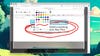
Tech Hacks photoDrawing tools are built right into Microsoft Edge. Screenshot: Microsoft

Full marks to Microsoft Edge, which has native annotation tools integrated into it—you don’t have to rely on a third-party extension tool if you’re using Edge. However, the tools aren’t quite as advanced as they are with some separate add-ons, so you might find you need some extra help after all.

The website annotation tools are connected to the screenshot feature: Click the three dots (top right), then Screenshot, and you’ll be asked if you want to grab an area of a page or the page in its entirety (including the parts you can’t see on screen). Once you’ve made your choice, a new window pops up on screen with the capture inside it.

Click Draw to start scribbling—if you click the arrow just to the side of Draw, you can change the color and thickness of your digital pen. There’s also the Erase tool, if you want to remove any of the writing you’ve put on top of the page. The options in the top right corner let you save the image, copy it to the clipboard, or share it to other apps.

If that’s not quite enough for you, Nimbus is definitely worth a look. It supports capturing single screenshots and longer screen recordings, and they can be embellished with drawings, shapes, text, and arrows. There’s plenty of functionality included for free, but for $5 a month you can get some additional features, such as watermarking options.

Mozilla Firefox
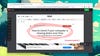
Tech Hacks photoZoho Annotator is a fully featured annotation tool for Firefox. Screenshot: Firefox, Annotator

As with Google Chrome, there’s no native website annotation function in Mozilla Firefox, but you can find several third-party extensions to do the job for you. Out of the ones we’ve seen, Zoho Annotator stands out: Click the extension icon in the toolbar, choose which part of the current website you want to grab, and you’re taken straight to the annotation screen.

All the key tools you might need are included here, letting you add shapes, lines, text, and arrows on top of the page you grabbed. When you’re done, the resulting file can be easily copied to the clipboard, saved to disk, or shared to other apps. The add-on is completely free to use, and you don’t even need to register an account.

Another similar tool worthy of your attention is Memex, which is designed primarily to help you with research projects (though you can actually use it for anything you like). The focus here is on selecting sections of websites, adding comments to them, and sharing them with other people—just as you might do with a document you were collaborating on with a group of people over the web.

The extension lets you save webpages into several custom spaces, pick out particular sections from pages, and add images and comments to them. It works with videos, PDFs and social media posts as well, so it’s a tool that’s comprehensive as well as slick. You’re able to save up to 25 pages per month free of charge, and after that you’ll need to pay from $6 a month for the premium package.

>>> Read full article>>>
Copyright for syndicated content belongs to the linked Source : Popular Science – https://www.popsci.com/diy/how-to-annotate-websites/


Tags: annotatescienceWebsite
Previous Post

A brief history of chairs in astronomy

Next Post

Bucks’ Damian Lillard Out vs. Dejounte Murray, Hawks Due to Personal Reasons

Discover Brandon Espiritu’s Must-Try Stress-Relief Activities for Ultimate Relaxation

January 10, 2026

The Top 3 Must-Watch Tech Stocks Set to Soar in 2026

January 10, 2026

Dodgers notes: Miguel Rojas, World Series ratings – Yahoo Sports

January 10, 2026

Lincoln Warns: Beware the Rise of Cowboy Diplomacy in a New World Order

January 10, 2026

Job Report Uncovers Troubling Signs of a Slowing Economy

January 10, 2026

How Seaport’s Upgrade Sparks New Optimism for Sphere Entertainment Despite Mixed Fundamentals

January 10, 2026

Revolutionizing Healthcare: Discover OpenAI’s Groundbreaking Innovation

January 10, 2026

Minnesota’s Political Shake-Up: From Democratic Disaster to GOP Dilemma

January 10, 2026

Rethinking Ecology: A Bold New Perspective Beyond Marx in Foster’s “The Return of Nature

January 10, 2026

Super Smart Dogs Master New Tricks by Eavesdropping on Humans

January 10, 2026

Categories

Archives

January 2026
M T W T F S S
 1234
567891011
12131415161718
19202122232425
262728293031  
« Dec    
Earth-News.info

The Earth News is an independent English-language daily published Website from all around the World News

Browse by Category

  • Business (20,132)
  • Ecology (1,014)
  • Economy (1,033)
  • Entertainment (21,909)
  • General (19,247)
  • Health (10,073)
  • Lifestyle (1,046)
  • News (22,149)
  • People (1,039)
  • Politics (1,047)
  • Science (16,248)
  • Sports (21,533)
  • Technology (16,016)
  • World (1,022)

Recent News

Discover Brandon Espiritu’s Must-Try Stress-Relief Activities for Ultimate Relaxation

January 10, 2026

The Top 3 Must-Watch Tech Stocks Set to Soar in 2026

January 10, 2026
  • About
  • Advertise
  • Privacy & Policy
  • Contact

© 2023 earth-news.info

No Result
View All Result

© 2023 earth-news.info

No Result
View All Result

© 2023 earth-news.info

Go to mobile version
