





* . *
  • About
  • Advertise
  • Privacy & Policy
  • Contact
Sunday, June 28, 2026
Earth-News
  • Home
  • Business
  • Entertainment

    Grammy-Winning R&B Star Faces Urgent Race Against Time for Life-Saving Double Lung Transplant

    How Penske Entertainment Transforms Data into an Unforgettable Fan Experience

    AMC Entertainment Raises $200 Million in Stock Offering to Drive Growth and Innovation

    Grammy-Winning Artist Ignites Fierce Debate with Bold Critique of Clive Davis’ Legacy on Social Media

    Crack the Code: Conquer Today’s CryptoQuote Challenge!

    Charlie Brown’s longtime pen pal is finally revealed in new Apple TV ‘Peanuts’ movie – Audacy

  • General
  • Health
  • News

    Cracking the Code: Why China’s Economic Challenges Aren’t Shaking Markets, Unlike America’s” – Bloomberg

    Trump’s Narrow Window to Spread the Truth About Harris

    Trump’s Narrow Window to Spread the Truth About Harris

    Israel-Gaza war live updates: Hamas leader Ismail Haniyeh assassinated in Iran, group says

    Israel-Gaza war live updates: Hamas leader Ismail Haniyeh assassinated in Iran, group says

    PAP Boss to Niger Delta Youths, Stay Away from the Protest

    PAP Boss to Niger Delta Youths, Stay Away from the Protest

    Court Restricts Protests In Lagos To Freedom, Peace Park

    Court Restricts Protests In Lagos To Freedom, Peace Park

    Fans React to Jazz Jennings’ Inspiring Weight Loss Journey

    Fans React to Jazz Jennings’ Inspiring Weight Loss Journey

    Trending Tags

    • Trump Inauguration
    • United Stated
    • White House
    • Market Stories
    • Election Results
  • Science
  • Sports
  • Technology

    Micron Technology (MU): 10 Must-Buy Stocks to Hold for the Next Decade

    Revolutionary Heart-in-a-Box Technology Expands Life-Saving Donor Opportunities at Hershey Medical Center

    Calhoun Community College Unveils Exciting New Diesel Technology Program This Fall

    Phillip O. Berry Academy of Technology Faces Off Against Oceanside in an Epic Basketball Showdown on June 26

    Micron Technology’s Bearish Momentum Intensifies: Key Insights for Investors

    Can Marvell Technology Sustain Its Remarkable AI Networking Momentum?

    Trending Tags

    • Nintendo Switch
    • CES 2017
    • Playstation 4 Pro
    • Mark Zuckerberg
No Result
View All Result
  • Home
  • Business
  • Entertainment

    Grammy-Winning R&B Star Faces Urgent Race Against Time for Life-Saving Double Lung Transplant

    How Penske Entertainment Transforms Data into an Unforgettable Fan Experience

    AMC Entertainment Raises $200 Million in Stock Offering to Drive Growth and Innovation

    Grammy-Winning Artist Ignites Fierce Debate with Bold Critique of Clive Davis’ Legacy on Social Media

    Crack the Code: Conquer Today’s CryptoQuote Challenge!

    Charlie Brown’s longtime pen pal is finally revealed in new Apple TV ‘Peanuts’ movie – Audacy

  • General
  • Health
  • News

    Cracking the Code: Why China’s Economic Challenges Aren’t Shaking Markets, Unlike America’s” – Bloomberg

    Trump’s Narrow Window to Spread the Truth About Harris

    Trump’s Narrow Window to Spread the Truth About Harris

    Israel-Gaza war live updates: Hamas leader Ismail Haniyeh assassinated in Iran, group says

    Israel-Gaza war live updates: Hamas leader Ismail Haniyeh assassinated in Iran, group says

    PAP Boss to Niger Delta Youths, Stay Away from the Protest

    PAP Boss to Niger Delta Youths, Stay Away from the Protest

    Court Restricts Protests In Lagos To Freedom, Peace Park

    Court Restricts Protests In Lagos To Freedom, Peace Park

    Fans React to Jazz Jennings’ Inspiring Weight Loss Journey

    Fans React to Jazz Jennings’ Inspiring Weight Loss Journey

    Trending Tags

    • Trump Inauguration
    • United Stated
    • White House
    • Market Stories
    • Election Results
  • Science
  • Sports
  • Technology

    Micron Technology (MU): 10 Must-Buy Stocks to Hold for the Next Decade

    Revolutionary Heart-in-a-Box Technology Expands Life-Saving Donor Opportunities at Hershey Medical Center

    Calhoun Community College Unveils Exciting New Diesel Technology Program This Fall

    Phillip O. Berry Academy of Technology Faces Off Against Oceanside in an Epic Basketball Showdown on June 26

    Micron Technology’s Bearish Momentum Intensifies: Key Insights for Investors

    Can Marvell Technology Sustain Its Remarkable AI Networking Momentum?

    Trending Tags

    • Nintendo Switch
    • CES 2017
    • Playstation 4 Pro
    • Mark Zuckerberg
No Result
View All Result
Earth-News
No Result
View All Result
Home Science

How to remove an iOS beta from your iPhone

June 25, 2023
in Science
How to remove an iOS beta from your iPhone
Share on FacebookShare on Twitter

The beta of iOS 17 has arrived and beta testers have raced to install it on their iPhones. Testing the beta of iOS 17 does give you a glimpse of what is to come later this year when the final version of iOS 17 arrives, but installing a beta can have more risks than benefits, especially early on in the beta testing process. If the buggy pre-release iOS 17 becomes more trouble than it is worth here’s how to remove it.

Step 1: Restore your iPhone to factory settings

In order to reinstall iOS 16 on your iPhone after you have been running the iOS 17 beta you will first need to restore your iPhone to factory settings.

To do this you will need to use the Finder on a Mac (or iTunes on a PC).

Plug your iPhone into the Mac (or PC). You will need to put your iPhone into Recovery Mode. To do so press the up volume and down volume in quick succession, then the side button but keep pressing the side button until you see the image above of a cable and laptop (expect it to take a while). Once your iPhone is in Recovery Mode, on your Mac or PC click on Restore. Wait while your iPhone is wiped.
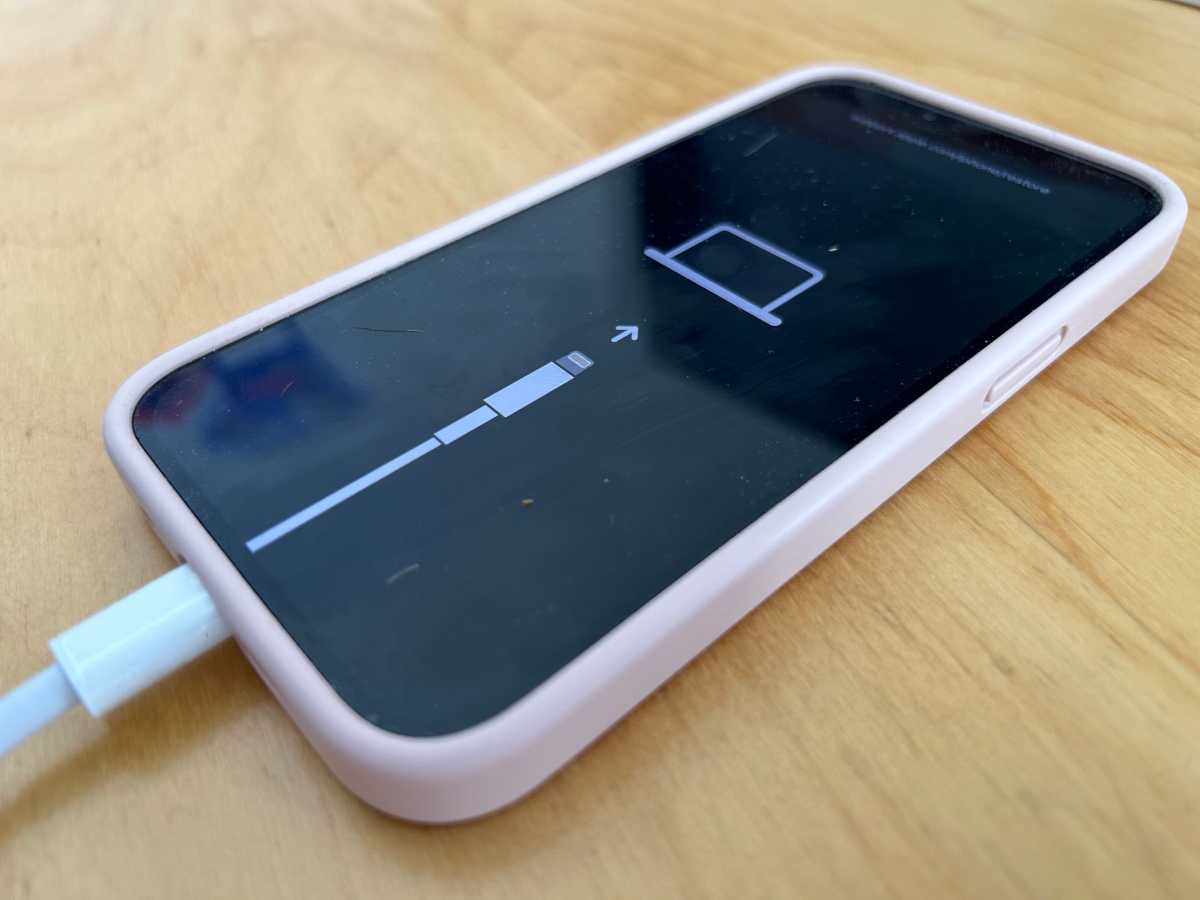
iPhone in recovery mode

Foundry

Step 2: Restore your iPhone using an iCloud backup

Now you can restore an old iCloud backup with all your data from before you installed the beta.

Now you have wiped your iPhone you can get on with the process of recovering it from a backup prior to your beta adventure.

Swipe up from the Welcome screen. Tap on English (or your language) and select your country or region. Click on Set Up Manually. Work through the various steps until you get to the Transfer Your Apps & Data screen and tap on From iCloud Backup.Log into your Apple ID and wait while your device signs in. Now choose an iCloud backup from before you downloaded the beta. Click on Show more backups to find an older one if you don’t see it.Wait while the Restore from iCloud takes place, which could take a while.
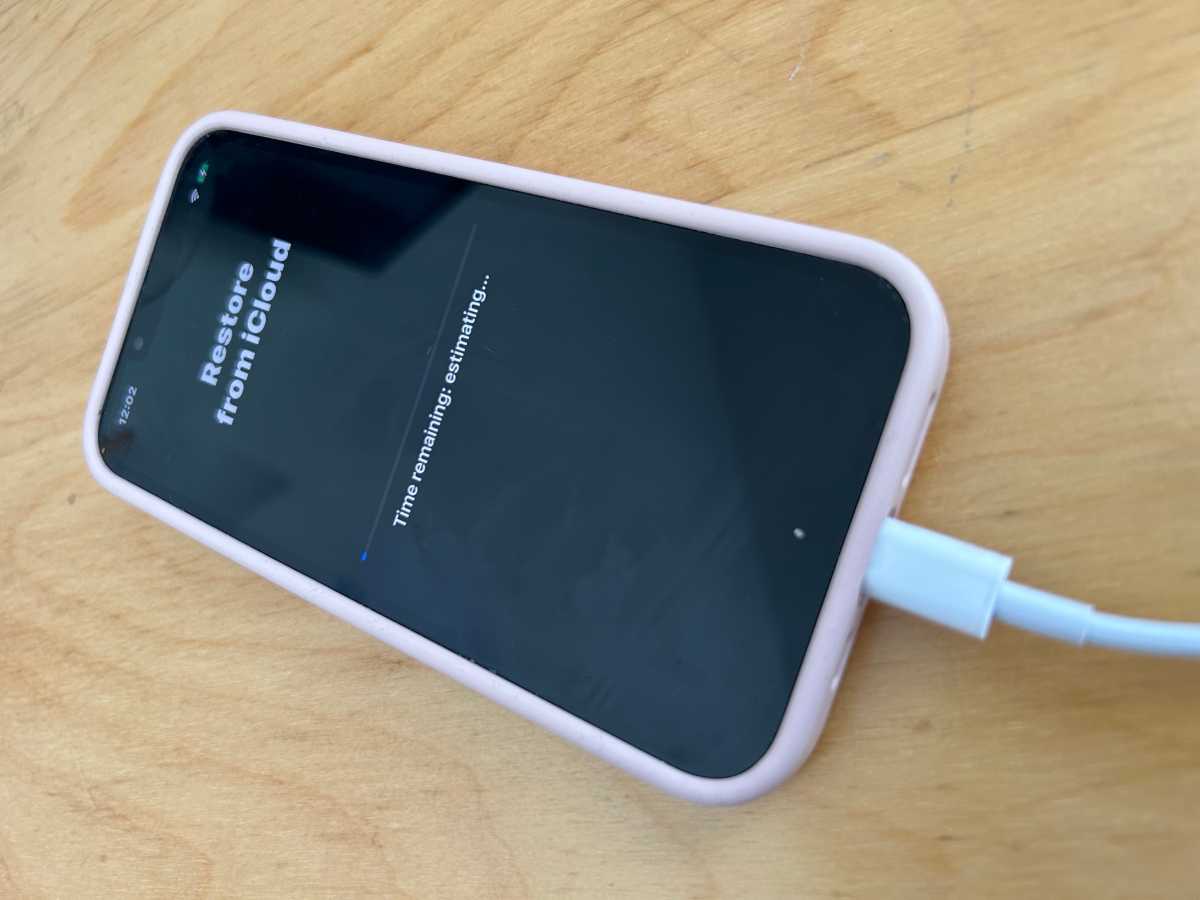
Restore iPhone from iCloud

Foundry

Step 3: Download iOS 16 from IPSW and install that (if Step 2 doesn’t work)

If the above options didn’t work for you, for some reason every time you recover from your iCloud back up your iPhone stubbornly continues to run iOS 17 we have one more option for you, which also requires you to use Recovery Mode.

Visit the IPSW website, here you will find versions of iOS 16 for the various iPhones. Click on the iPhone icon. Find your iPhone and click on that. Now download the latest ‘signed’ IPSW. Next you need to put your iPhone into Recovery Mode: plug into your Mac, open the Finder (on a PC it’s iTunes) and then press the up volume and down volume in quick succession, then the side button and keep holding the side button until you see the image above of a cable and laptop. Once you are in Recovery Mode on your Mac you should click on Restore, but at the same time press the Option/Alt key. This will allow you to find the version of iOS 16 you just downloaded. Select that and recover your iPhone.
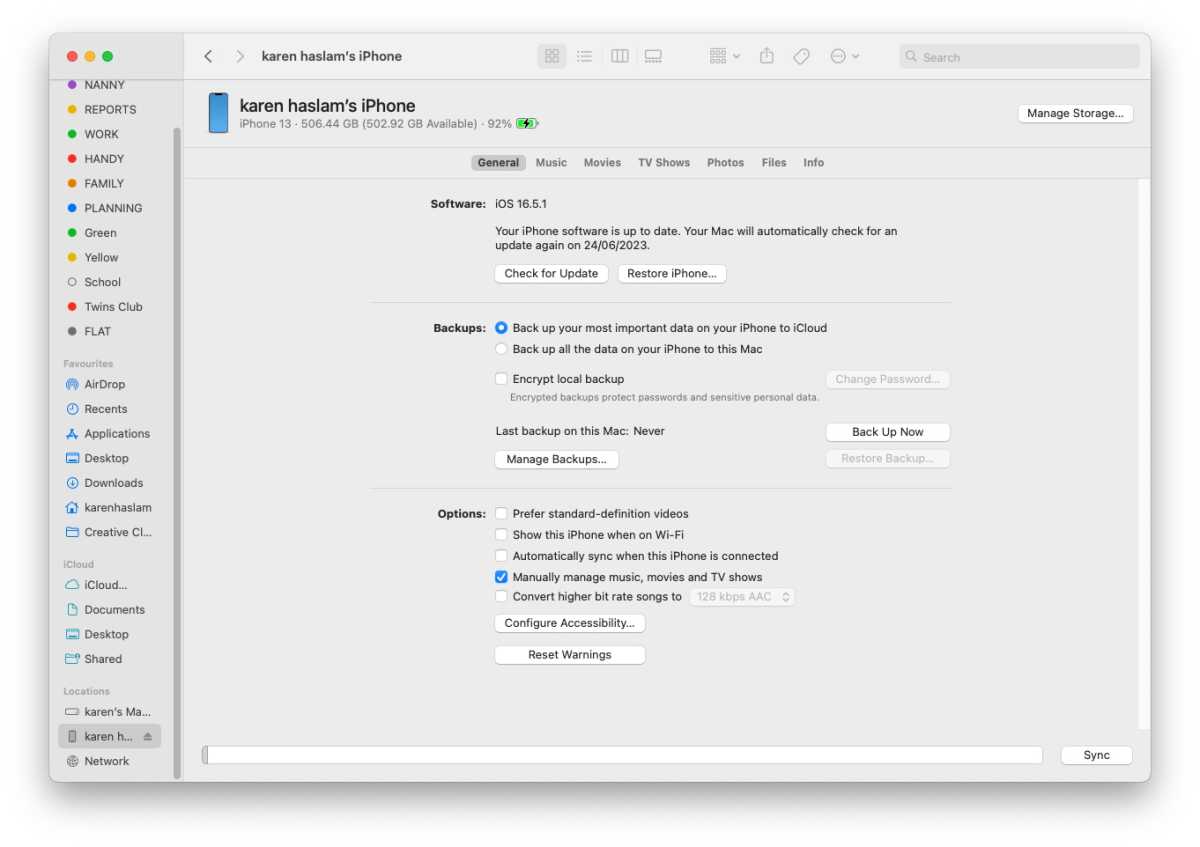
Revert iPhone software to old iOS

Foundry

How to leave the beta program

If you want no part of the iOS beta program you can remove your device from it. That way you won’t be able to see any Beta updates, and won’t be tempted to install them.

To leave the iOS 17 beta program, follow these steps on your iPhone:

Remove your device from the iOS beta program.

Sign in. Click Leave Program.

If you ever decide you want back into the beta program–like when the iOS 18 public beta arrives, for instance, you can head over to the Apple Beta Software Program site and re-enroll your device. Read more about how to be a beta tester here: How to join Apple’s beta program and try out new software.

How to stop getting iOS Beta updates

You don’t have to leave the beta program though, you could just turn off Beta Updates so that you don’t receive them on your device.

Once the final version of iOS 17 arrives Apple will continue to issue beta updates as it works on new features. But now that your iPhone has a stable release of a shiny new operating system, you might not want to keep up with the betas anymore. It is easy to stop getting beta updates and just use the final version.

Open Settings. Tap on General. Tap on Software Update.Tap on Beta Updates. Tap on Off. Tap on Back.

Now you’ll only receive software updates when Apple pushes them to the general public, roughly once every six weeks. You can still see that there is a beta update, but your iPhone won’t volunteer to download them unless you switch Beta Updates back on by following the steps above.

How to remove a Beta Profile

Prior to iOS 16.3, the process for removing an iOS beta was different.

Head over to the Settings app.Tap General. Tap on VPN & Device Management. Select the iOS Beta Software Profile that appears. Tap Remove Profile. Enter your device password.Tap Remove a second time to confirm. The iPhone will now need to restart.

We also cover How to remove macOS beta from a Mac.

Author: Karen Haslam, Editor

Macworld editor since 2008, Karen has worked on both sides of the Apple divide, clocking up a number of years at Apple’s PR agency prior to joining Macworld almost two decades ago. 

Karen’s career highlights include interviewing Apple’s Steve Wozniak and discussing Steve Jobs’ legacy on the BBC. Her focus is Mac, but she lives and breathes Apple.

>>> Read full article>>>
Copyright for syndicated content belongs to the linked Source : MacWorld – https://www.macworld.com/article/1067004/how-to-remove-ios-beta-iphone.html


Tags: iPhoneremovescience
Previous Post

Get started with astronomy with this fantastic telescope bundle deal

Next Post

Best Prime Day Apple deals 2023

Politics Unusual: Co-chairs of NYC-DSA, Rep. Malliotakis – FOX 5 New York

June 28, 2026

Micron Technology (MU): 10 Must-Buy Stocks to Hold for the Next Decade

June 27, 2026

Revolutionizing Ecological Design: How One Local Company is Transforming Landscapes

June 27, 2026

2026 World Cup Preview: France Emerges as the Clear Favorite to Win

June 27, 2026

How Cooperation Among Unrelated Individuals During Birth Fuels Sperm Whale Social Complexity

June 27, 2026

This Clever Trap Tricks Ants Into Taking the Bait

June 27, 2026

14 Creative and Unforgettable Ways to Celebrate America’s 250th Birthday

June 27, 2026

How Coach Mauricio Pochettino Turned the U.S. World Cup Team into True Believers

June 27, 2026

Duncan Hines Days Festival Sparks Over $2.2 Million Economic Boost for Local Community

June 27, 2026

Network Reaches Incredible Milestone: One Billion Health Records Exchanged

June 27, 2026

Categories

Archives

June 2026
M T W T F S S
1234567
891011121314
15161718192021
22232425262728
2930  
« May    
Earth-News.info

The Earth News is an independent English-language daily published Website from all around the World News

Browse by Category

  • Business (20,132)
  • Ecology (1,288)
  • Economy (1,309)
  • Entertainment (22,186)
  • General (22,335)
  • Health (10,344)
  • Lifestyle (1,321)
  • News (22,149)
  • People (1,312)
  • Politics (1,330)
  • Science (16,523)
  • Sports (21,807)
  • Technology (16,294)
  • World (1,301)

Recent News

Politics Unusual: Co-chairs of NYC-DSA, Rep. Malliotakis – FOX 5 New York

June 28, 2026

Micron Technology (MU): 10 Must-Buy Stocks to Hold for the Next Decade

June 27, 2026
  • About
  • Advertise
  • Privacy & Policy
  • Contact

© 2023 earth-news.info

No Result
View All Result

© 2023 earth-news.info

No Result
View All Result

© 2023 earth-news.info

Go to mobile version
