







Protecting your personal data isn’t just smart these days—it’s a necessity. As the world grows more and more connected, your private info becomes more and more valuable. Whether it’s using leaked info from website breaches to hack into your other accounts or holding your personal computer ransom for money, malicious evildoers won’t hesitate to ruin your day if it puts profits in their pockets.
All is not lost though. Following some basic security principles can help protect you from most of the attacks you’ll find on the World Wild Web. Better yet, these five easy security tasks should take only a short while to get set up. Do them now and sleep easier at night.
Further reading: Be safe! How I set up a ‘Paranoid PC’ to surf the risky web
1. Use a password manager
On of the biggest security risks these days is password reuse. Major websites and services report massive data breaches on a shockingly regular basis. If you’re using the same email and password for multiple accounts, and any of those accounts leak, attackers can hack into your other ones using the information.
Using strong, unique passwords for every account you own protects against that—but memorizing a different random password for every website you create an account for is next to impossible. That’s where password managers come in. These tools can create strong randomized passwords for you, store the information, and automatically fill in login fields on websites and software alike. Browsers are starting to offer basic password management tools too. They work in a pinch, and you shouldn’t feel ashamed about using Chrome’s password manager over nothing, but aren’t good enough overall. Investing in a proper password manager is well worth it (especially because many services offer a free tier).
Our guide to the best password managers can help you find the perfect fit for your needs.
2. Enable two-factor authentication
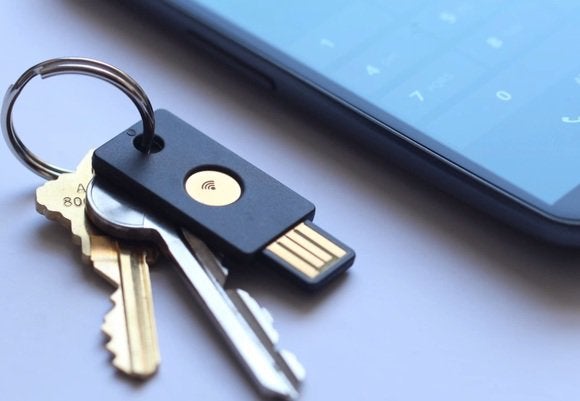
The FIDO Alliance’s U2F open standard lets compatible USB key drives and other small devices simplify two-factor authentication.
The FIDO Alliance’s U2F open standard lets compatible USB key drives and other small devices simplify two-factor authentication.
The FIDO Alliance’s U2F open standard lets compatible USB key drives and other small devices simplify two-factor authentication.
Most major services now offer a two-factor authentication feature, especially if they handle more sensitive personal data. Turn it on whenever you can. If a hacker does somehow manage to gain access to your login information, 2FA can still save your bacon.
Two-factor authentication requires you to confirm your account two ways before you’re able to log in: with something you know, and something you have. The “something you know” is your username and password. The “something you have” comes courtesy of an authorized tool you have in your possession. Usually, 2FA requires you to input a code that’s either sent to you via text message or email when you try to log in on a device for the first time, or to grab a code from a supported 2FA app, or connect a security device devoted to account authentication. The exact method varies by service, and many offer several 2FA options. Without that code, hackers can’t break into your account even if they have your login information.
Some services, including Google accounts, are switching to passwordless “passkey” authentication that supercharge security without needing 2FA, but that technology is still in its early adoption days. Microsoft and Apple have also committed to adopting passkeys in time.
Our two-factor authentication guide explains the concept more deeply, and includes our picks for the best 2FA apps and hardware. Uber was hacked because an employee was tricked into sharing their 2FA code, however—even with two-factor authentication active, make sure you aren’t sharing those crucial codes with anybody else.
3. Stay safe with security software
Now that your online accounts are locked down, it’s time to turn our attention to security for your personal computer. You don’t want malware secretly siphoning off your information while you’re banking or browsing your medical history, after all, while ransomware can lock you out of your computer completely until you pay a bounty.
That’s where security software comes in. Yes, you still want to run antivirus and a firewall even in 2024. Good news, though: The Microsoft firewall that ships with Windows 10 and Windows 11 gets the job done just fine these days, while the Windows Security tools that come bundled with the operating system (including antivirus) now offer surprisingly good antivirus protection. Better yet, they’re enabled by default in Windows if you aren’t running a third-party alternative.
You still may want to run paid-for security software, as those suites offer much more than mere antivirus protection these days—you’ll also receive tools that protect against malicious ads and emails, more advanced firewalls, family protection for several devices, VPN access, and more. We regularly evaluate security software, and our guide to the best Windows antivirus suites can walk you through the top options. Use something though, even if it’s just Windows Security.
4. Don’t use a Windows admin account

You can’t install software or run elevated permissions with a standard account, but that’s a good thing for security.
You can’t install software or run elevated permissions with a standard account, but that’s a good thing for security.
You can’t install software or run elevated permissions with a standard account, but that’s a good thing for security.
Here’s one of the biggest under-the-radar security pro tips around: Don’t use a Windows administrator account day-to-day. Instead, use a secondary standard account.
A lot of malware tries to sneak itself on your system. Only administrator accounts can install software in Windows. If you’re using a standard account, you won’t be able to allow a rogue program onto you PC accidentally (at least not easily). For the best security, set up your computer with all the software you need using an admin account, but then use a secondary standard account to go about your business in general life. It’s very easy to switch over to your administrator account quickly when you need to install something new.
And definitely set your friends and family up with standard accounts if you’re sharing your computer with others. This Microsoft help page explains how to create accounts in Windows 10.
5. Back up your data
Finally, backing up your data is an underappreciated but vital aspect of your security toolkit. If a virus does manage to breach your computer’s defenses, having a comprehensive backup can help you restore any lost data, and potentially help you sidestep ransomware bounties.
There’s no single way to back up your data. Some people take “images” of the entire operating system, others rely on online backup services, and some folks simply drag key files over to external hard drives on the reg. Any method works as long as you’re doing something!
We’ve got several resources that can help you set up a data recovery plan, including guides to the best Windows backup software and the best online backup services. We’ve also rounded up the top free backup services, and have a guide explaining how you can back up your data for free using built-in Windows tools. Using free tools typically require a more patchwork, intensive process than the user-friendly premium offerings, but hey—they work.
Editor’s note: This article is periodically updated, most recently to update the intro and include relevant new links and info throughout.
>>> Read full article>>>
Copyright for syndicated content belongs to the linked Source : PCWorld – https://www.pcworld.com/article/394001/5-simple-tasks-supercharge-digital-security.html



