







Is it really possible to make current graphics cards from AMD’s Radeon RX and Nvidia’s GeForce RTX series with just one click? Yes, it’s possible, and quite simple, as I will demonstrate in this easy-to-understand step-by-step guide.
The key to quickly optimizing your graphics card lies in the best possible configuration of the so-called “Power Targets (PT)” or “Power Limits (PL),” which significantly influence the maximum power consumption of the graphics processor (GPU) and the graphics memory (VRAM).
Further reading: Best graphics cards for PC gaming
This is exactly where we start and have to use two different tools, depending on whether we want to optimize an AMD Radeon RX or an Nvidia GeForce RTX.
Optimize Radeon with one click
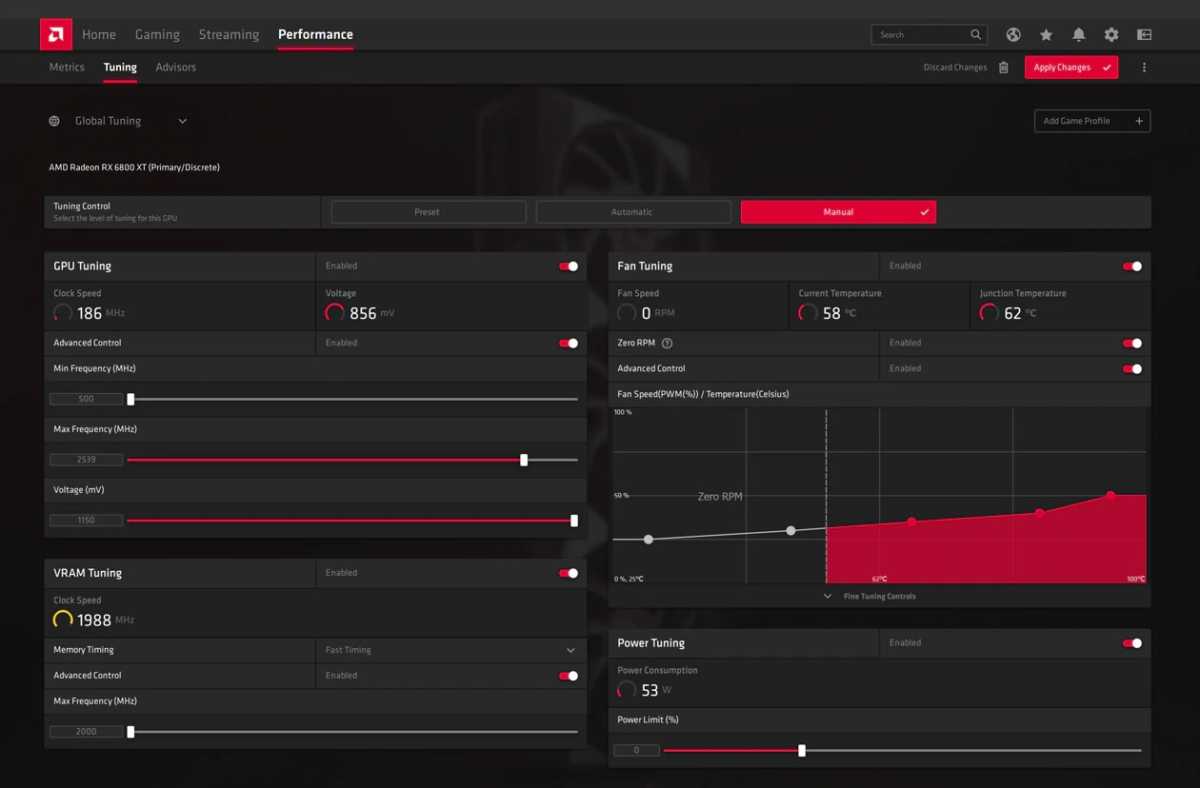
You want to optimize a Radeon RX 5000 (RDNA), Radeon RX 6000 (RDNA 2) or Radeon RX 7000 (RNDA 3) with just one click? Then AMD Software: Adrenalin Edition is the right tool for you to pursue this goal.
The tidy, modern and user-friendly interface, which bundles quick access to all software functions, game statistics, and performance values, as well as driver updates in one place, also helps to optimize the graphics card.
With the key combination Alt+R, the multifunction tool can also be called up directly in games at any time. To start optimizing, call up the graphics card tool directly from the Windows 10 or Windows 11 Start menu.
AMD
In the Performance area, you can now set the so-called Power Limit (PL) and use it to tune the performance.
The Power Limit indicates by percentage what performance level should be sent to the graphics processor. In the factory settings provided by the manufacturer, this value is usually defined as 100 percent by default.
To make the graphics processor and, correspondingly, the entire graphics card work more efficiently and thus cooler, lower this value step by step from 100 to 80 to 60 percent.
In our tests, this optimization, which can be realized with just one click, resulted in significantly lower power consumption, heat development, and noise.
All measurement results were determined in Full HD (1080p) with Dying Light 2: Stay Human on a Radeon RX 5700 XT:
Frames per second (FPS)
100% Power Limit: 77 FPS (base)
80% Power Limit: 72 FPS (- 6.5%)
60% Power Limit: 66 FPS (- 14.3%)
GPU clock frequency
100% Power Limit: 1,820 MHz (base)
80% Power Limit: 1,700 MHz (-6.6%)
60% Power Limit: 1,450 MHz (-20.3%)
GPU temperature
100% Power Limit: 82 °C (base)
80% Power Limit: 78 °C (-4.9%)
60% Power Limit: 76 °C (-7.3%)
Fan speed at load
100% Power Limit: 2,100 RPM (base)
80% Power Limit: 1,650 RPM (-21.4%)
60% Power Limit: 1,150 RPM (-45.2%)
Power consumption (total PC)
100% Power Limit: 305 Watt (Base)
80% Power Limit: 260 Watt (-14.8%)
60% Power Limit: 210 Watt (-31.1%)
As can be seen from this example, by lowering the power limit from 100 to 80 percent you can already save more than 14 percent energy and run your graphics card about 5 percent cooler and significantly quieter.
The performance loss is only 6.5 percent, which is usually absolutely negligible. The great advantages of a significantly more efficient graphics card easily compensate for this small penalty. The one-click optimization is worthwhile for almost everyone.
If, instead, you want even greater performance reserves from your graphics card, you can also change the power limit to positive by +10 to +30 percent, depending on the graphics card. A positive power limit of 110 to 130 percent, however, goes hand in hand with higher power consumption, heat development, and noise.
If you want to optimize your Radeon graphics card even further, PCWorld has the right tips for you: AMD Radeon tuning guide: 6 tips to optimize your graphics card.
Optimize GeForce with one click
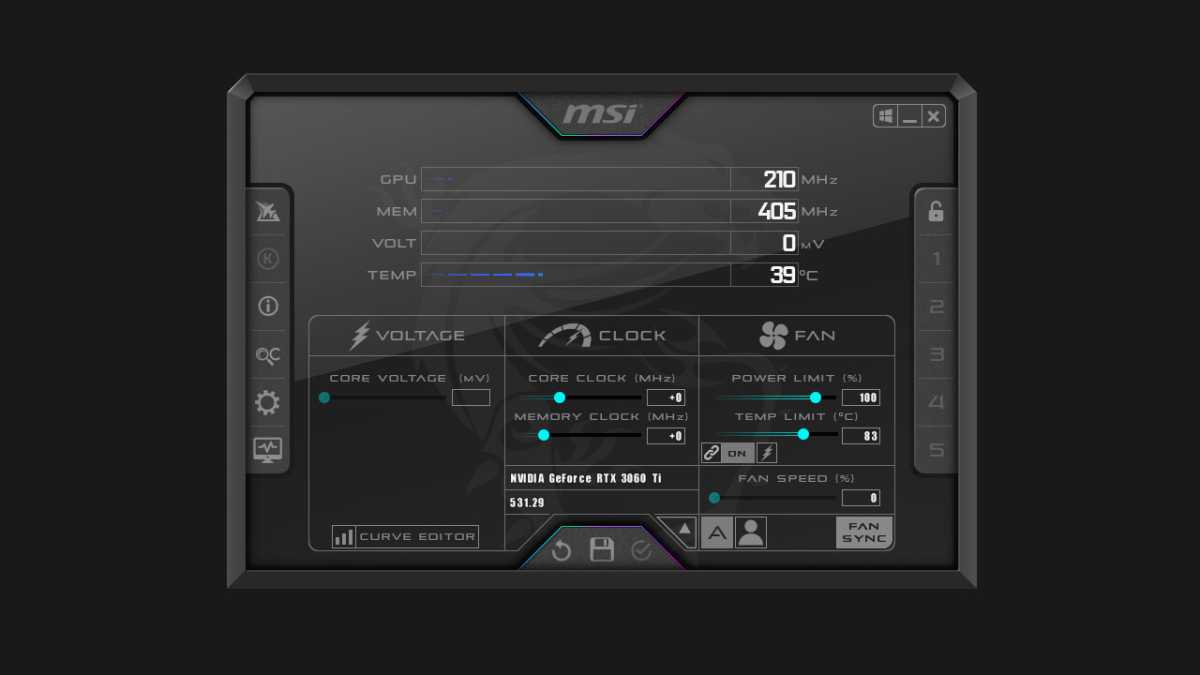
You want to optimize a GeForce RTX 2000 (Turing), GeForce RTX 3000 (Ampere) or GeForce RTX 4000 (Ada Lovelace) with just one click? Then you have to resort to a popular third-party software, MSI Afterburner.
MSI
The Power Limit specifies in percentage what power level should be sent to the graphics processor. In the factory settings provided by the manufacturer, this value is usually defined as 100 percent by default.
In order to make the graphics processor and thus the entire graphics card work more efficiently and thus cooler, lower this value step by step from 100 to 80 and 60 percent.
The corresponding option for this can be found in MSI Afterburner on the main screen under “Power Limit (%).”
The GeForce RTX 3080 tests also runs cooler, quieter, and more efficiently after the change.
All measurement results were determined in 4K/UHD (2160p) with Cyberpunk 2077 on a GeForce RTX 3080:
Frames per second (FPS)
100% power limit: 42 FPS (base)
80% Power Limit: 40 FPS (- 4.8%)
60% Power Limit: 37 FPS (- 11.9%)
GPU clock frequency
100% Power Limit: 1,875 MHz (base)
80% Power Limit: 1,750 MHz (-6.7%)
60% Power Limit: 1,545 MHz (-17.6%)
GPU temperature
100% Power Limit: 75 °C (base)
80% Power Limit: 71 °C (-5.3%)
60% Power Limit: 64 °C (-14.7%)
Fan speed at load
100% Power Limit: 1,850 RPM (base)
80% Power Limit: 1,630 RPM (-11.9%)
60% Power Limit: 1,296 RPM (-29.9%)
Power consumption (total PC)
100% Power Limit: 570 Watt (Base)
80% Power Limit: 480 Watt (-15.8%)
60% Power Limit: 410 watts (-28.1%)
As can be seen from this example, by lowering the power limit from 100 to 80 percent you can already save almost 16 percent energy and run your graphics card around 5 percent cooler and significantly quieter.
The performance loss is only 4.8 percent, which is usually absolutely negligible. The great advantages of a significantly more efficient graphics card easily compensate for this small penalty. The one-click optimization is worthwhile for almost everyone.
Here, too, the following applies: If you want even greater performance reserves from your graphics card instead, you can also change the power limit +10 to +30 percent into the positive, depending on the graphics card. A positive power limit of 110 to 130 percent goes hand in hand with higher power consumption, heat generation, and noise.
If you want to optimize your GeForce graphics card even further, PCWorld offers tips on overclocking: How to use Nvidia’s performance tuning tool for one-click GeForce overclocking.
More GPU performance through undervolting
The supreme discipline in overclocking is being able to operate the graphics card with more or at least the same performance, sometimes with significantly less consumption.
To do this, it is necessary to lower the voltage of the graphics processor and thus to perform “undervolting.” PCWorld explains how this works in a separate article: How to undervolt your graphics card.
To reduce the power consumption of the graphics card, either the supply voltage or the power limit must be reduced. It doesn’t really matter which method you ultimately decide on, as there is now a suitable tool from every manufacturer.
The following tools, among others, are suitable for overclocking and undervolting:
MSI Afterburner
EVGA Precision X1
Palit ThunderMaster
Nvidia GeForce Experience
Asus Tweak II and Asus Tweak III
Gigabyte Control Center
Zotac Firestorm
Note: These manufacturer tools also work without problems with graphics cards from other manufacturers.
This article was translated from German to English and originally appeared on pcwelt.de.
>>> Read full article>>>
Copyright for syndicated content belongs to the linked Source : PCWorld – https://www.pcworld.com/article/2054936/how-to-make-your-graphics-card-better-with-just-one-click.html



