





* . *
  • About
  • Advertise
  • Privacy & Policy
  • Contact
Tuesday, February 24, 2026
Earth-News
  • Home
  • Business
  • Entertainment

    Cuatro Talents Ready to Deliver a Flawless ’10’ Performance!

    Penn Entertainment Boosts Leadership Team with Three New Independent Directors

    One Battle After Another’ Sweeps BAFTA Film Ceremony with 6 Awards and an Unforgettable Surprise

    Nashville Venue at Risk of Closing After Property Taxes Skyrocket Nearly 400%

    Experience the Ultimate In-Flight Entertainment and Cozy Up Like Never Before

    Betway Teams Up with M+C Saatchi Sport & Entertainment in Thrilling New Partnership

  • General
  • Health
  • News

    Cracking the Code: Why China’s Economic Challenges Aren’t Shaking Markets, Unlike America’s” – Bloomberg

    Trump’s Narrow Window to Spread the Truth About Harris

    Trump’s Narrow Window to Spread the Truth About Harris

    Israel-Gaza war live updates: Hamas leader Ismail Haniyeh assassinated in Iran, group says

    Israel-Gaza war live updates: Hamas leader Ismail Haniyeh assassinated in Iran, group says

    PAP Boss to Niger Delta Youths, Stay Away from the Protest

    PAP Boss to Niger Delta Youths, Stay Away from the Protest

    Court Restricts Protests In Lagos To Freedom, Peace Park

    Court Restricts Protests In Lagos To Freedom, Peace Park

    Fans React to Jazz Jennings’ Inspiring Weight Loss Journey

    Fans React to Jazz Jennings’ Inspiring Weight Loss Journey

    Trending Tags

    • Trump Inauguration
    • United Stated
    • White House
    • Market Stories
    • Election Results
  • Science
  • Sports
  • Technology

    VENU Partners with AmpThink to Revolutionize Operational Efficiency with Cutting-Edge Technology

    Missouri Technology Corp. Taps State Senator to Lead Bold Innovation Push

    Must-See Tech Breakthroughs from February 23-27, 2026

    Bronson Methodist Hospital Leads the Way with Breakthrough VARIPULSE™ Technology in Southwest Michigan

    Building an Inclusive AI Image Generator That Empowers Non-English Speakers

    Cushman & Wakefield Launches Groundbreaking AI Tool Amid Industry Debate Over Technology’s Impact

    Trending Tags

    • Nintendo Switch
    • CES 2017
    • Playstation 4 Pro
    • Mark Zuckerberg
No Result
View All Result
  • Home
  • Business
  • Entertainment

    Cuatro Talents Ready to Deliver a Flawless ’10’ Performance!

    Penn Entertainment Boosts Leadership Team with Three New Independent Directors

    One Battle After Another’ Sweeps BAFTA Film Ceremony with 6 Awards and an Unforgettable Surprise

    Nashville Venue at Risk of Closing After Property Taxes Skyrocket Nearly 400%

    Experience the Ultimate In-Flight Entertainment and Cozy Up Like Never Before

    Betway Teams Up with M+C Saatchi Sport & Entertainment in Thrilling New Partnership

  • General
  • Health
  • News

    Cracking the Code: Why China’s Economic Challenges Aren’t Shaking Markets, Unlike America’s” – Bloomberg

    Trump’s Narrow Window to Spread the Truth About Harris

    Trump’s Narrow Window to Spread the Truth About Harris

    Israel-Gaza war live updates: Hamas leader Ismail Haniyeh assassinated in Iran, group says

    Israel-Gaza war live updates: Hamas leader Ismail Haniyeh assassinated in Iran, group says

    PAP Boss to Niger Delta Youths, Stay Away from the Protest

    PAP Boss to Niger Delta Youths, Stay Away from the Protest

    Court Restricts Protests In Lagos To Freedom, Peace Park

    Court Restricts Protests In Lagos To Freedom, Peace Park

    Fans React to Jazz Jennings’ Inspiring Weight Loss Journey

    Fans React to Jazz Jennings’ Inspiring Weight Loss Journey

    Trending Tags

    • Trump Inauguration
    • United Stated
    • White House
    • Market Stories
    • Election Results
  • Science
  • Sports
  • Technology

    VENU Partners with AmpThink to Revolutionize Operational Efficiency with Cutting-Edge Technology

    Missouri Technology Corp. Taps State Senator to Lead Bold Innovation Push

    Must-See Tech Breakthroughs from February 23-27, 2026

    Bronson Methodist Hospital Leads the Way with Breakthrough VARIPULSE™ Technology in Southwest Michigan

    Building an Inclusive AI Image Generator That Empowers Non-English Speakers

    Cushman & Wakefield Launches Groundbreaking AI Tool Amid Industry Debate Over Technology’s Impact

    Trending Tags

    • Nintendo Switch
    • CES 2017
    • Playstation 4 Pro
    • Mark Zuckerberg
No Result
View All Result
Earth-News
No Result
View All Result
Home Technology

How to test your VPN speed

February 23, 2024
in Technology
How to test your VPN speed
Share on FacebookShare on Twitter

VPNs, or virtual private networks, are a great way to protect your privacy and keep your activities anonymous while online. Unfortunately, they also tend to slow down your internet connection while in use.

This comes down to the very nature of how a VPN works. By connecting to a VPN, your data is rerouted through the VPN’s server(s) and encrypted. This process can adversely affect both the speed of your connection as well as the latency.

If you’re curious about how a particular VPN is affecting your connection speeds there are a couple of easy steps you can take to determine any speed loss.

Further reading: The fastest VPNs

How to test a VPN’s speeds

In order to get a good idea of how much slower your connection is while using a VPN, it’s essential to set a baseline. This means that you’ll first need to test your internet speed while disconnected from a VPN.

The best way to do this is to use a site like speedtest.net, run by analytics company Ookla. Alternatively, you can use fast.com by Netflix, but SpeedTest is the most popular and considered the industry standard. For the purposes of this article, I’ll demonstrate using SpeedTest.
SpeedTest

Sam Singleton

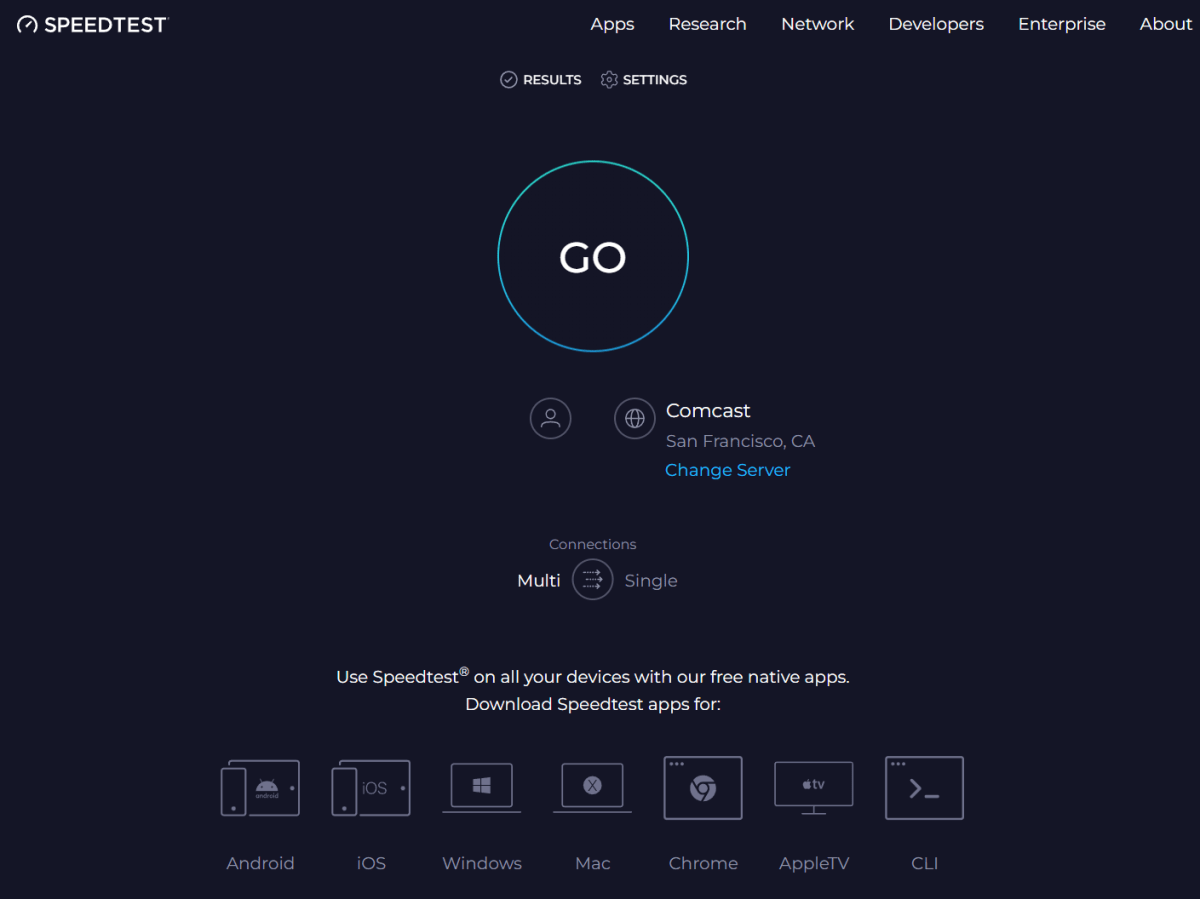
Make sure you are disconnected from your VPN and then go to the SpeedTest website. After you open the website, click the “Go” button to begin the test. It will begin measuring your download and upload speeds.
SpeedTest

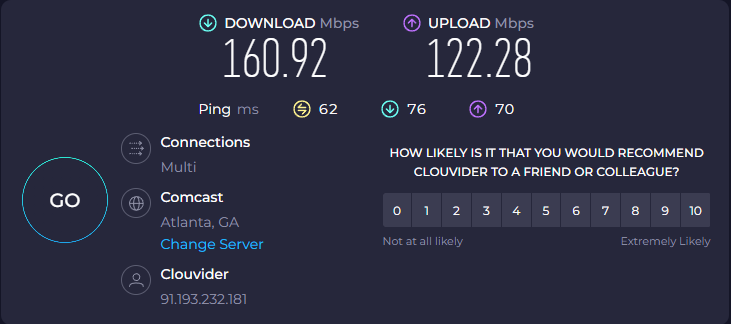
The baseline internet speed I was working with during this test.

Sam Singleton

Once it wraps up, you’ll be able to see the download and upload speeds along with the ping or latency of your connection.

Next up, let’s test the speed while connected to a VPN. Connect to the VPN and server of your choosing. For this test, I’ll be using ExpressVPN as it’s our top pick here at PCWorld and one of the fastest VPNs on the market today. 

Bring up SpeedTest once again and click the “Go” button to test your new connection. You’ll very likely see your download and upload speeds take a hit — that’s to be expected.

SpeedTest

Connected to a VPN server on the West coast. Note the drop in speeds and increased ping latency.

Sam Singleton

Once the second test is finished, you can compare the results between your baseline internet speed and the speed while connected to a VPN. It’s important to note that these speeds can vary quite often, sometimes drastically, depending on a number of factors, which I describe below. 

Also, you’ll want to pay close attention to each specific element of the test when factoring in the adverse speed effects of a VPN — download speeds, upload speeds, and ping or latency. Each of these can have different consequences depending upon your preferred online activities.

What do my download and upload speeds and ping mean?

Download speeds are likely the most important factor to consider for most internet users. It determines how fast you can browse the web and stream content while online. If your download speeds are significantly affected by your VPN then you’ll notice a decline in these basic internet activities.

Upload speeds on the other hand will be important for those who need to do file sharing or video calls. Slow upload speeds can be a huge drag especially for professionals and people who work from home.

Ping, or latency, is the time it takes for data to travel between devices or servers on a network. Your ping is particularly important if you play online games as it’ll influence how fast your commands or actions in a game are transmitted over your connection, a measurement also known as latency.

What affects VPN speeds?

There are numerous factors that can affect your speeds at any given time while connected to a VPN. The most common culprits are usually distance between yourself and a server, the current load on that server, and how your data is encrypted through the VPN.

VPN server distance

The distance between your device and the VPN’s server is generally the most influential factor when it comes to speed. When sending signals over the internet this data is contained in packets that have to travel a physical path to the server from your device. Even though it does this very quickly, time is still time.

It follows then that a server farther away will take more time to communicate with than a server nearby. A good way to test this is to connect to two different servers in different time zones and conduct a speed test with both. Most likely, the server farther away will be slower if all other factors are equal.

VPN server load

A VPN’s servers can only handle so much at any given moment. Anyone who is using that VPN’s server at the same time as you will draw on the server’s resources. If there are a lot of people using the server at once, especially during peak hours, then a VPN’s server is bound to slow down due to all of the traffic. 

Fortunately, most of the top VPNs nowadays utilize high-capacity servers that can handle large traffic volumes. However, even with these servers, you’ll still likely notice a drop in speed during peak hours.

VPN encryption

Encryption can also be a factor affecting your connection speeds with a VPN, although typically to a lesser degree. The more secure an encryption cipher is, the longer it’ll take the VPN to encrypt that data. However, even with the super-strong industry standard AES-256 encryption, modern VPN infrastructure can encrypt this data so quickly that it’s unlikely to significantly affect speeds.

How to choose the fastest VPN and connection

There is no guarantee that the fastest VPN for me will be the fastest VPN for you. Everyone will use a VPN slightly differently and in different locations and at different times. That being said, there are a few things you can consider if you want to optimize your chances of landing a fast VPN.

The first is a VPN’s server coverage. If a VPN provides a ton of servers then it’s a good bet you’ll be able to find at least one that provides you with decent speeds. 

Next, you can look at a VPN’s server network. VPN services are notorious for keeping the details about their server networks private, but you can generally trust the major players to have good networks with high-capacity servers. Our favorites such as ExpressVPN, NordVPN, and Surfshark all have excellent server networks with plenty of locations to choose from. 

Finally, for more advanced users, you can opt for a VPN with fast protocol options. These include OpenVPN, WireGuard, and IKEv2 or even proprietary protocols such as ExpressVPN’s Lightway and NordVPN’s NordLynx. Just be careful as different protocols come with advantages and disadvantages in regards to both speed and security.

>>> Read full article>>>
Copyright for syndicated content belongs to the linked Source : PCWorld – https://www.pcworld.com/article/2241391/how-to-test-your-vpn-speed.html


Tags: speedtechnology
Previous Post

Must-use Windows software: 17 PC apps you need to try in 2024

Next Post

Dell XPS 16 (2024) review: Performance nearly smothered in costly style

Tokyo Bay’s Night Lights Reveal Hidden Boundaries Between Species

February 24, 2026

Schrödinger’s Color Theory Perfected After a Century of Discovery

February 24, 2026

Ecology’s war on ‘invasive’ species isn’t science – Aeon

February 24, 2026

8 Daily Habits That Keep People Over 70 Feeling Decades Younger and Happier

February 24, 2026

Exploring the World’s Most Breathtaking Skyscrapers

February 24, 2026

How China’s 5-year energy plan could change the way it powers its economy – South China Morning Post

February 24, 2026

Cuatro Talents Ready to Deliver a Flawless ’10’ Performance!

February 24, 2026

Essential Resources and Latest Updates for Health Care Providers in Florida

February 24, 2026

How Politics Influences the Stories Behind Park Service Signs

February 24, 2026

VENU Partners with AmpThink to Revolutionize Operational Efficiency with Cutting-Edge Technology

February 24, 2026

Categories

Archives

February 2026
M T W T F S S
 1
2345678
9101112131415
16171819202122
232425262728  
« Jan    
Earth-News.info

The Earth News is an independent English-language daily published Website from all around the World News

Browse by Category

  • Business (20,132)
  • Ecology (1,089)
  • Economy (1,106)
  • Entertainment (21,983)
  • General (20,074)
  • Health (10,146)
  • Lifestyle (1,122)
  • News (22,149)
  • People (1,111)
  • Politics (1,123)
  • Science (16,321)
  • Sports (21,608)
  • Technology (16,088)
  • World (1,098)

Recent News

Tokyo Bay’s Night Lights Reveal Hidden Boundaries Between Species

February 24, 2026

Schrödinger’s Color Theory Perfected After a Century of Discovery

February 24, 2026
  • About
  • Advertise
  • Privacy & Policy
  • Contact

© 2023 earth-news.info

No Result
View All Result

© 2023 earth-news.info

No Result
View All Result

© 2023 earth-news.info

Go to mobile version
