






At a glance
Pros
Reliable, easy to set up, and good at working behind the scenes to create backup archivesEasy to migrate Time Machine data over to new Macs as neededGood level of encryption-based security for backup data
Cons
Almost exclusively local backups rather than cloud-based backupsLimited backup scheduling optionsRestore interface can be confusing
Our Verdict
Time Machine remains an outstanding solution for local backups on your Mac, but backups require an external drive, no cloud backups here.
Best Prices Today: Apple Time Machine

$0
We all understand the importance of backing up a Mac, despite so much of our life being stored in the cloud. If anything happens to your Mac and you need to recover your data then you will be glad to have a backup. Regularly backing up a Mac is one of the easiest things you can do thanks to the included Time Machine software, but many still don’t do so. In our review of Time Machine we will explain just how easy it is to back up a Mac with Time Machine and why you should.
We look at other Mac backup options separately, many of which offer more than Time Machine, but aren’t free like Time Machine. We also explain How to back up a Mac and How to use Time Machine and how to restore from a Time Machine backup elsewhere.
What does Time Machine do
Since its introduction way back in 2007 with Mac OS X 10.5 (“Leopard”), Apple’s Time Machine backup utility has been among the best tools for local (and sometimes NAS-based) backups. The software functions on the idea of creating a full-sized initial backup of every file on your Mac, and then making incremental backups throughout the day as long as your Mac is attached to a designated Time Machine external backup drive, filled a niche, and made local, automated backups easy enough to be a background task.
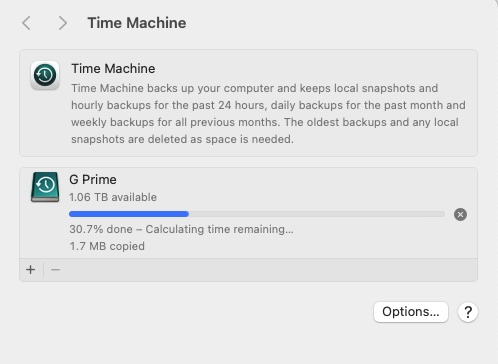 A routine backup with Apple’s Time Machine backup software in macOS Sonoma
A routine backup with Apple’s Time Machine backup software in macOS Sonoma
Foundry
A routine backup with Apple’s Time Machine backup software in macOS Sonoma
Foundry
Foundry
Time Machine has gotten progressively better with each new version of macOS, and it’s both simplicity and reliability that make it worth your attention. Just boot up your Mac, connect an external USB or Thunderbolt hard drive or SSD, to your Mac, and your version of macOS will ask if you’d like to use the external drive as a Time Machine backup drive, pairing it to that Mac while allowing the drive to be disconnected and used as an external drive for other computers.
It’s the first backup that always takes the longest given that every file on your Mac is being rolled into the Time Machine backup, but it gets quicker from there, as only recently used files are copied over in subsequent backups.
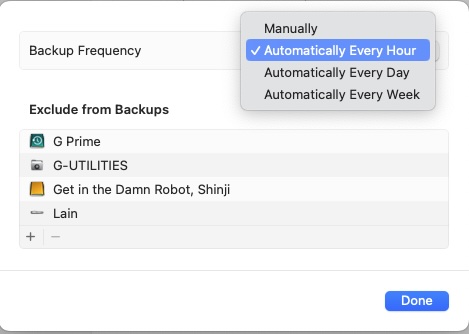 Setting Time Machine’s backup schedule on a manual, hourly, weekly, or monthly.
Setting Time Machine’s backup schedule on a manual, hourly, weekly, or monthly.
Foundry
Setting Time Machine’s backup schedule on a manual, hourly, weekly, or monthly.
Foundry
Foundry
One of the most interesting and useful elements of Time Machine has always been its Restore function, which allows you to open the Time Machine, scroll through past backups, locate the files you’re looking for, and restore them to a location of your choice. This comes in handy if you’ve accidentally deleted some files, remember you saw them a week ago, and dig back to recover the most recent version. Alternatively, you may have made changes to a file and then realized that you need to go back to an earlier version, Time Machine can help with that too. This, when paired with the macOS Migration Assistant utility, makes it easy to restore certain file types.
Migration Assistant makes porting data and user profiles from an old Mac to a new one simple. It’s easy to add multiple/redundant backup drives as well. Just add a new external drive and Time Machine will ask if you’d like this to become a Time Machine backup drive for your Mac as well. For users importing a Time Machine backup to a new Mac, Time Machine inherits previous backups well and rolls these over to the new Mac with ease, which is always appreciated.
For the security-minded, Time Machine offers good, if not extensive, features. It’s easy to designate a password with which to encrypt your Time Machine backups, and while you’re up a creek without a paddle should you forget the password, this can help keep someone from snagging your Time Machine backup drive and having easy access to its files. Other small touches, such as the macOS reminding you how many days have passed since your last Time Machine backup, prove helpful, and nudge you in the direction of always having your backup drive connected to your Mac, as it won’t do much good just sitting on a shelf somewhere.
What Time Machine doesn’t do
For all its strengths, there are still some weaknesses within Time Machine to consider. Except for the Time Capsule routers of yesteryear and certain NAS drives that support the Time Machine protocol, Time Machine is geared towards local backups. Local backups are always an ideal solution, but the online automated backup market has grown considerably over the past several years, and services such as iCloud, OneDrive, Dropbox, Box, and others have seen impressive growth as a result. It’s always best to have both a local and secure off-site copy of your data, and Time Machine is more geared towards the external hard drive on your desk, which can be lost, damaged, or stolen.
A lack of specification in terms of choosing which files to include or exclude when backing data up means that you’ll wind up storing every file on your Mac. This isn’t a bad thing, but it can occupy more space on your Time Machine backup drive, where some users might prefer a more elegant approach that’s suited to the data they want to back up and nothing more. This, along with no specific backup scheduling feature behind setting it to back up on a manual, hourly, weekly, or monthly basis, can be a bit grating to users who want more control over the process. This isn’t a terrible approach, but there’s something to be said for a predictable schedule (i.e., overnight when you’re sleeping), and Apple has kept Time Machine’s options simple without offering this choice to its user base.
Should you use Time Machine?
Despite its foibles, Time Machine remains an outstanding solution for local backups on your Mac. Yes, you’ll need to keep an external hard drive connected to your Mac for it to work consistently, and this isn’t as convenient as an automated cloud-based system automatically tossing your backup files online throughout the day, and yes, an external hard drive can be lost, damaged, or fail with little to no warning, but there’s still an excellent level of protection that’s been built into the operating system. If you haven’t set up a Time Machine backup, this is worth looking into, snagging a good external hard drive, and taking a few minutes to set yourself up for the future.
You may be thinking that the important files you work on daily are stored in the cloud, but beware that there will inevitably be things that are only on your Mac along with all your settings, software and anything pre-cloud that you don’t want to lose. Time Machine is a simple system to avoid the worst case scenario.
>>> Read full article>>>
Copyright for syndicated content belongs to the linked Source : MacWorld – https://www.macworld.com/article/2309079/apple-time-machine-review.html



