





* . *
  • About
  • Advertise
  • Privacy & Policy
  • Contact
Friday, July 3, 2026
Earth-News
  • Home
  • Business
  • Entertainment

    What Will Be Celebrated as an American Classic 250 Years from Now?

    How Investors Might Respond to PENN Entertainment’s Aurora Casino Launch and the Russell 2000 Shake-Up

    Discover La Jolla’s Unmissable Entertainment and Experiences: Your Ultimate Guide

    Seaport Entertainment GC Steps Into New Role as Strategic CEO Adviser

    PENN Entertainment to Reveal Second Quarter Results and Host Live Conference Call on August 6

    Get Ready for Dancing, Music, and Lobster Tales at the Opera House!

  • General
  • Health
  • News

    Cracking the Code: Why China’s Economic Challenges Aren’t Shaking Markets, Unlike America’s” – Bloomberg

    Trump’s Narrow Window to Spread the Truth About Harris

    Trump’s Narrow Window to Spread the Truth About Harris

    Israel-Gaza war live updates: Hamas leader Ismail Haniyeh assassinated in Iran, group says

    Israel-Gaza war live updates: Hamas leader Ismail Haniyeh assassinated in Iran, group says

    PAP Boss to Niger Delta Youths, Stay Away from the Protest

    PAP Boss to Niger Delta Youths, Stay Away from the Protest

    Court Restricts Protests In Lagos To Freedom, Peace Park

    Court Restricts Protests In Lagos To Freedom, Peace Park

    Fans React to Jazz Jennings’ Inspiring Weight Loss Journey

    Fans React to Jazz Jennings’ Inspiring Weight Loss Journey

    Trending Tags

    • Trump Inauguration
    • United Stated
    • White House
    • Market Stories
    • Election Results
  • Science
  • Sports
  • Technology

    Is tech ruining the World Cup? – BBC

    Arch Appoints Chief Technology Officer – Family Wealth Report

    CrowdStrike Named Frost & Sullivan’s 2026 Global Enabling Technology Leader in Zero Trust Browser Security – Yahoo Finance

    Revolutionary AI Tool Set to Transform RNA Mapping, Challenging AlphaFold 3

    Essential Insights from Bosch’s BIS Settlement and DOJ Declination: What Every Company Using U.S. Technology Must Understand About the Foreign Direct Product Rule

    US Intensifies Trade Restrictions with Expanded Ban on Chinese Technology Imports

    Trending Tags

    • Nintendo Switch
    • CES 2017
    • Playstation 4 Pro
    • Mark Zuckerberg
No Result
View All Result
  • Home
  • Business
  • Entertainment

    What Will Be Celebrated as an American Classic 250 Years from Now?

    How Investors Might Respond to PENN Entertainment’s Aurora Casino Launch and the Russell 2000 Shake-Up

    Discover La Jolla’s Unmissable Entertainment and Experiences: Your Ultimate Guide

    Seaport Entertainment GC Steps Into New Role as Strategic CEO Adviser

    PENN Entertainment to Reveal Second Quarter Results and Host Live Conference Call on August 6

    Get Ready for Dancing, Music, and Lobster Tales at the Opera House!

  • General
  • Health
  • News

    Cracking the Code: Why China’s Economic Challenges Aren’t Shaking Markets, Unlike America’s” – Bloomberg

    Trump’s Narrow Window to Spread the Truth About Harris

    Trump’s Narrow Window to Spread the Truth About Harris

    Israel-Gaza war live updates: Hamas leader Ismail Haniyeh assassinated in Iran, group says

    Israel-Gaza war live updates: Hamas leader Ismail Haniyeh assassinated in Iran, group says

    PAP Boss to Niger Delta Youths, Stay Away from the Protest

    PAP Boss to Niger Delta Youths, Stay Away from the Protest

    Court Restricts Protests In Lagos To Freedom, Peace Park

    Court Restricts Protests In Lagos To Freedom, Peace Park

    Fans React to Jazz Jennings’ Inspiring Weight Loss Journey

    Fans React to Jazz Jennings’ Inspiring Weight Loss Journey

    Trending Tags

    • Trump Inauguration
    • United Stated
    • White House
    • Market Stories
    • Election Results
  • Science
  • Sports
  • Technology

    Is tech ruining the World Cup? – BBC

    Arch Appoints Chief Technology Officer – Family Wealth Report

    CrowdStrike Named Frost & Sullivan’s 2026 Global Enabling Technology Leader in Zero Trust Browser Security – Yahoo Finance

    Revolutionary AI Tool Set to Transform RNA Mapping, Challenging AlphaFold 3

    Essential Insights from Bosch’s BIS Settlement and DOJ Declination: What Every Company Using U.S. Technology Must Understand About the Foreign Direct Product Rule

    US Intensifies Trade Restrictions with Expanded Ban on Chinese Technology Imports

    Trending Tags

    • Nintendo Switch
    • CES 2017
    • Playstation 4 Pro
    • Mark Zuckerberg
No Result
View All Result
Earth-News
No Result
View All Result
Home Technology

This amazing iOS 17 feature clones your voice. Here’s how it works

August 9, 2023
in Technology
This amazing iOS 17 feature clones your voice. Here’s how it works
Share on FacebookShare on Twitter

Personal Voice is an accessibility-centric feature in iOS 17 that saves a likeness of your voice, just the way different Siri voices come pre-installed on your phone. It integrates with the in-built Live Speech system and reads out on-screen content or any other data stored on the phone in your own voice.

Apple says the new feature lets “users at risk of losing their ability to speak to create a voice that sounds like them.” For example, people living with ALS, vocal cord haemorrhage, laryngeal cancer, and multiple sclerosis have a high risk of losing their voice. Even excessive use, or misuse of the vocal cords can lead to such a grave outcome.

To address such a scenario, Apple developed Personal Voice so that users can still retain a digital semblance of their real voice and use it to communicate with their friends and family members. It can be used for FaceTime calls, during regular phone calls, and in any assistive app of your choice.
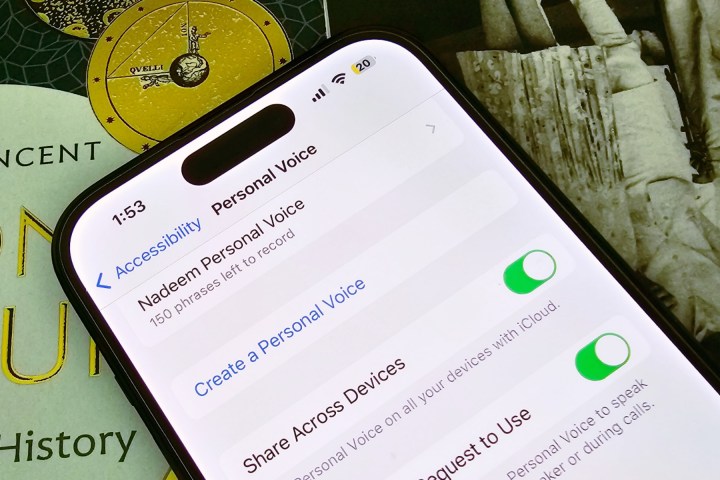
Personal Voice feature on iPhone.
Activating Personal Voice on an iPhone

Nadeem Sarwar / Digital Trends

How to create a Personal Voice in iOS 17

You can create a Personal Voice using an iPhone running iOS 17, and even an iPad running iPadOS 17. The only limitation is that it is currently exclusive to the English language. And if you wish to create it using a Mac, it must have one of Apple’s own M-series processors inside.

With that all in mind, here’s how to set up the Personal Voice feature:

Step 1: Open the Settings app on your iPhone.
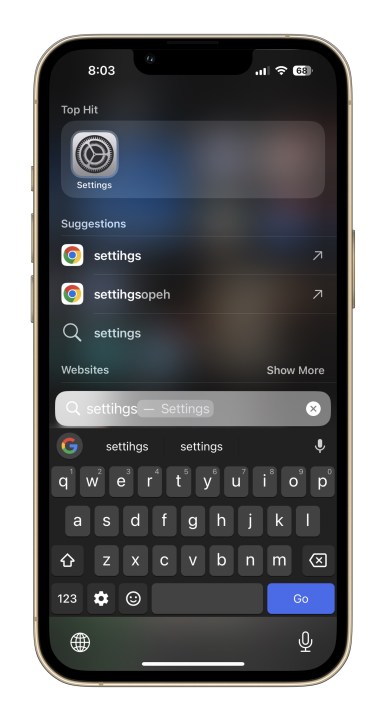
Settings app on iPhone

Step 2: Scroll down and tap on Accessibility.
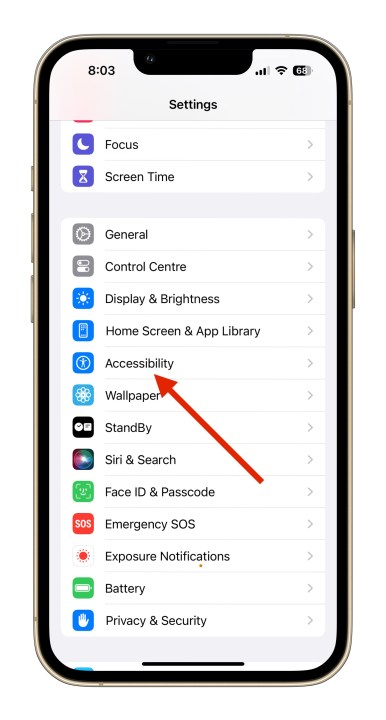
Personal Voice Feature in iOS 17 accessibility system.

Step 3: On the Accessibility page, navigate downwards and select Personal Voice.
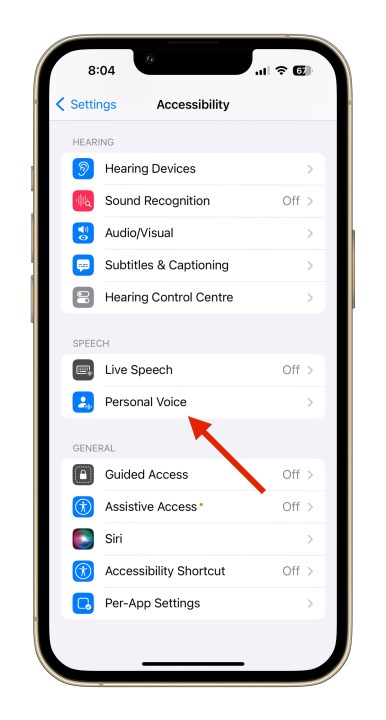
Personal Voice Feature in iOS 17 function.

Step 4: As you land on the next page, tap on the option that says Create a Personal Voice.
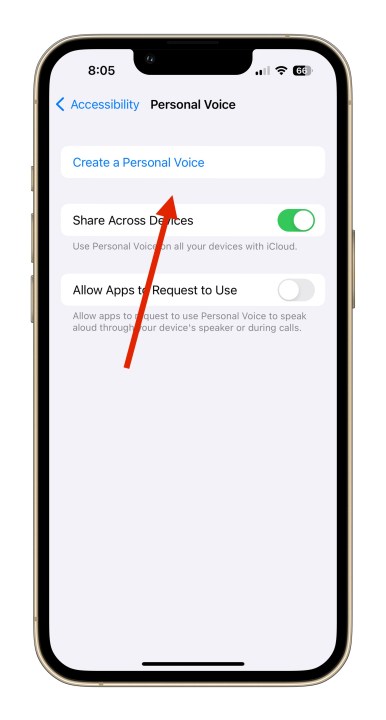
Personal Voice Feature in iOS 17 initial setup.

Step 5: An on-screen pop-up will now explain what this feature is all about and some instructions, as well. At the bottom, hit the blue OK button.
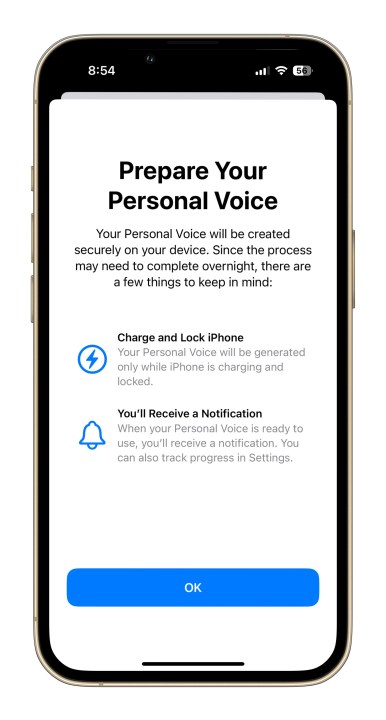
Personal Voice Feature in iOS 17 1.

Step 6: Next, you will be asked to set the name for the Personal Voice you are about to record. Once you’ve decided on the name, tap on Continue and proceed to the next stage.

Step 7: You will now see a page that says Check Sound Quality. Here, tap on the red record button at the bottom and read the line(s) that appear in bold text at the center of the screen.
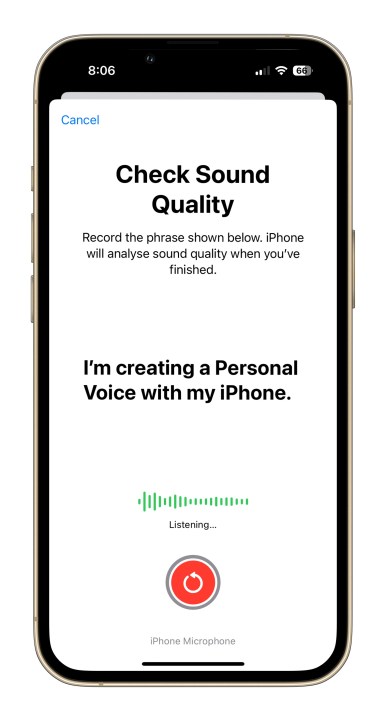
Personal Voice Feature in iOS 17 check sound quality.

Step 8: Once you’ve recorded the first line, the training system will show a message that says “Moving to the next phrase” above the red recorder button. Then, it will automatically keep giving you fresh lines until you’ve recorded all 150 of them.
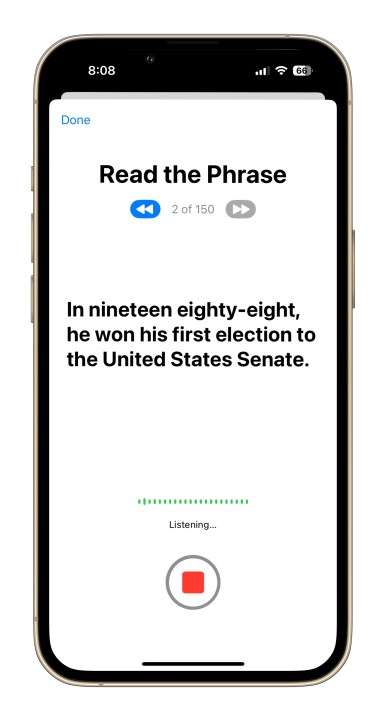
Personal Voice Feature in iOS 17 phrase reading.

Step 9: After all the training lines have been recorded, you will see an on-screen message that says “You’re Done Recording.” As you hit the Continue button at the bottom, you will be asked to grant it notification access. Select Allow in the prompt box.
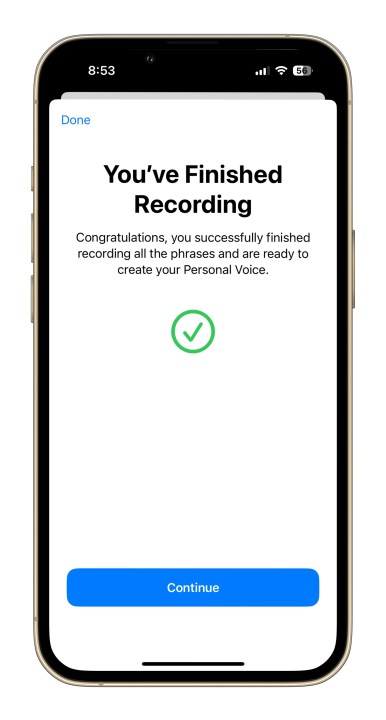
Personal Voice Feature in iOS 17 5.

Step 10: Next, you need to plug your phone in for charging and leave it in a locked state for the recordings to process. Once a Personal Voice based on your own vocal likeness has been created, you will receive a notification that it’s ready for further setup.
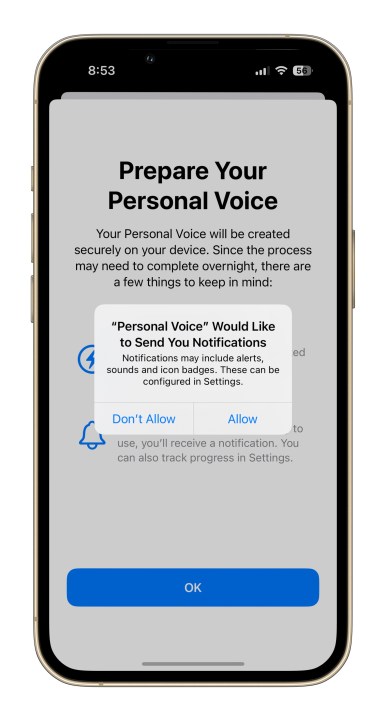
Personal Voice Feature in iOS 17 4.

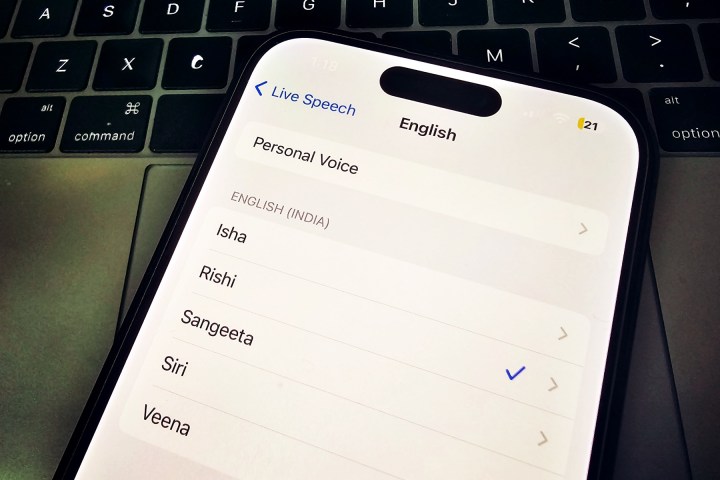
Personal Voice under Live Speech section
Enabling Personal Voice in iOS 17

Nadeem Sarwar / DigitalTrends

How to use your Personal Voice

As mentioned above, a notification will tell you when your Personal Voice bank is ready. You can head into the settings and replace the default Siri voice with one that sounds like your very own.

In our testing, it took around nine hours for the Personal Voice to be get processed. We also noticed that the Personal Voice doesn’t immediately appear in the Live Speech settings. You might want to reboot the phone or wait a bit for it to pop in the Voices section.

Once the Personal Voice is ready at system level, it’s a fairly simple process and all it takes are a few steps that are detailed below:

Step 1: Open the Settings app on your iPhone and click on Accessibility.

Personal Voice Feature in iOS 17 accessibility system.

Step 2: On the Accessibility dashboard, scroll down until you find Live Speech.
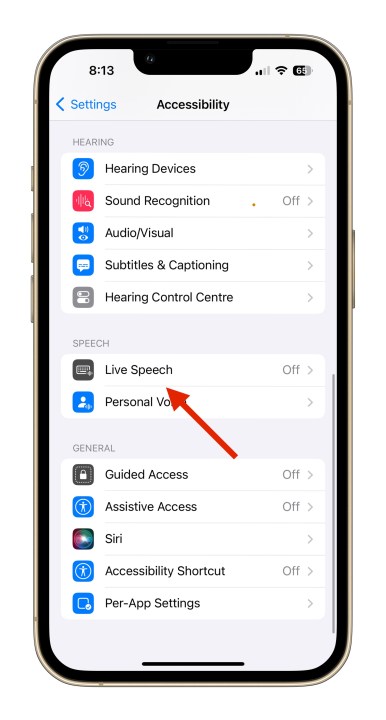
Personal Voice Feature in iOS 17 live speech option.

Step 3: Enable the Live Speech toggle on the next page. Below it you will see the language option under the Voices banner and the corresponding voice in a format like this: English (U.K.): Samantha.
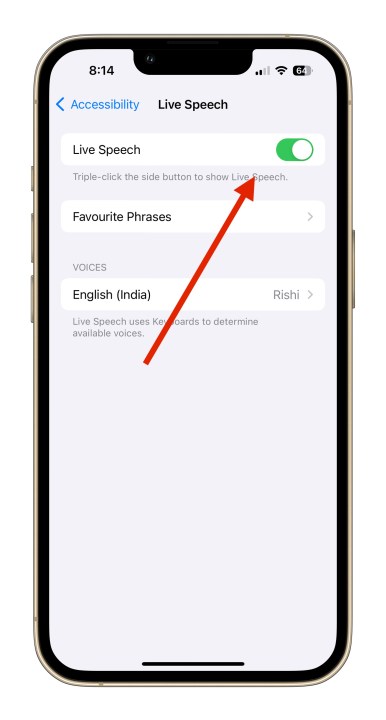
Personal Voice Feature in iOS 17 live speech.

Step 4: As you tap on the Voices option and land on the next page, select Personal Voice appearing at the top.
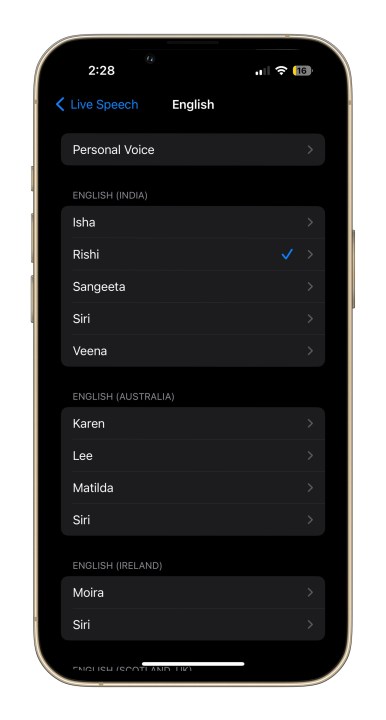
Personal Voice setting in iOS 17.

Step 5: On the next page, you will see the name you originally set for your personal voice. Tap on it and you’re good to go.
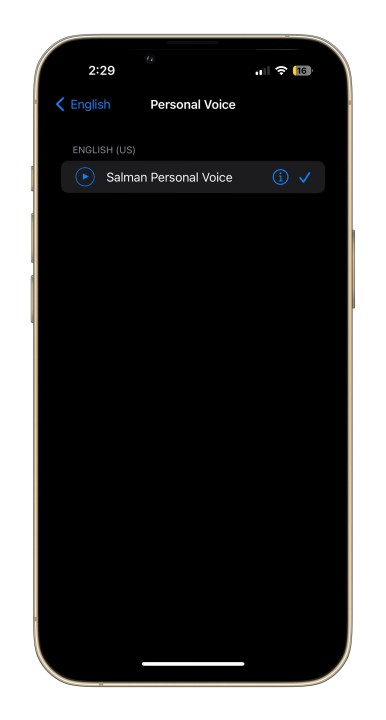
Picking up Personal Voice on iPhone.

Once you have enabled your Personal Voice as your Live Speech preference, it can be used for a wide range of tasks. During voice and FaceTime calls, all the text you type will be read out loud in your own voice. It can do the same job during in-person conversations, as well.

Alternatively, you can also save some of the most commonly used phrases and keep them handy for any kind of conversation in the future. In our tests, we found that the distinct audio signature is replicated well using Personal Voice, but it does make the signature pauses and nuances sound somewhat robotic, especially if you are a non-native English speaker.

Even so, it’s impressive to have such a powerful feature baked right into your iPhone — especially one that’s as easy to use as Personal Voice is.

Editors’ Recommendations

The iPhone 15 release date just leaked. Here’s when you can buy it

How to fix the ‘iPhone Unavailable’ error (4 easy ways)

Your next iPhone may have no bezels. Here’s why that could be a problem

iPadOS 17 just made my favorite iPad feature even better

I’ll be furious if the iPhone 15 Pro doesn’t get this one feature

>>> Read full article>>>
Copyright for syndicated content belongs to the linked Source : Digital Trends – https://www.digitaltrends.com/mobile/ios-17-how-to-use-personal-voice-clone-voice-iphone/


Tags: AmazingFeaturetechnology
Previous Post

This Samsung 32-inch QHD gaming monitor is $100 off today

Next Post

Get Organized After a Summer Getaway

Garden Walk Celebrates Local Landscapes While Supporting Ecology Center Scholarships

July 3, 2026

Is tech ruining the World Cup? – BBC

July 3, 2026

The 20 things in sports I only wish I could declare independence from this year – Chicago Sun-Times

July 3, 2026

One Injection That Can Reverse Osteoarthritis in Just Weeks

July 3, 2026

Croatia Sparks Controversy with ‘Unambitious’ 2022 Science Law Reforms

July 3, 2026

Marian Rivera Shares Candid Insights on Her Personal Growth Journey

July 3, 2026

From Heartbreak to Heroism: How Colombia’s Crushing Defeat to France Transformed Their World Cup Journey

July 3, 2026

Trump’s Job Market Defies Consumer Doubts with Surprising Strength

July 2, 2026

SyracuseCoE to Host Exciting International Healthy Buildings Conference

July 2, 2026

What Will Be Celebrated as an American Classic 250 Years from Now?

July 2, 2026

Categories

Archives

July 2026
M T W T F S S
 12345
6789101112
13141516171819
20212223242526
2728293031  
« Jun    
Earth-News.info

The Earth News is an independent English-language daily published Website from all around the World News

Browse by Category

  • Business (20,132)
  • Ecology (1,297)
  • Economy (1,316)
  • Entertainment (22,195)
  • General (22,433)
  • Health (10,353)
  • Lifestyle (1,330)
  • News (22,149)
  • People (1,321)
  • Politics (1,338)
  • Science (16,531)
  • Sports (21,816)
  • Technology (16,303)
  • World (1,310)

Recent News

Garden Walk Celebrates Local Landscapes While Supporting Ecology Center Scholarships

July 3, 2026

Is tech ruining the World Cup? – BBC

July 3, 2026
  • About
  • Advertise
  • Privacy & Policy
  • Contact

© 2023 earth-news.info

No Result
View All Result

© 2023 earth-news.info

No Result
View All Result

© 2023 earth-news.info

Go to mobile version
